السلام عليكم.اخواني بهاذ الموضوع بهذا الرابط .. مشاركة رقم33
http://vb4arb.com/vb/showthread.php?tid=17542&page=4
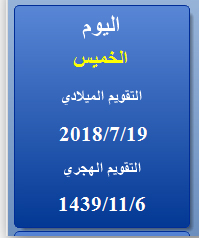
الليبل المكتوب عليه كلمة : اليوم
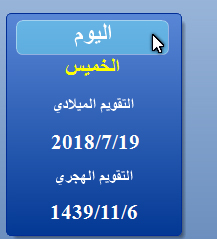
عندما امرر عليه الماوس يصير بهاذ الشكل
الادوات هي بمكتبة DevComponents.DotNetBar2
جربت لكن ما عرفت كيف تسوية هاي الحركة.شكر للكل اخواني
الأمر لا يحتاج الى مكتبات يمكنك أن تصنع أدواتك بنفسك
هذا Label يعطيك ما تريد
كود :
Class MyLabel

    Inherits Label

    Private HooverBackColor As Color

    Private HooverTextColor As Color

    Private HooverBorderColor As Color

    Private Shape As Drawing2D.GraphicsPath


    Sub New()

        Font = New System.Drawing.Font("Segoe UI", 8)

        ForeColor = Color.FromArgb(142, 142, 142)

        BackColor = Color.Transparent

        HooverBackColor = Color.LightBlue

        HooverTextColor = Color.White

        HooverBorderColor = Color.White

    End Sub

    Protected Overrides Sub OnMouseEnter(ByVal e As System.EventArgs)

        MyBase.OnMouseEnter(e)


        Shape = New Drawing2D.GraphicsPath

        With Shape

            .AddArc(0, 0, 10, 10, 180, 90)

            .AddArc(Width - 11, 0, 10, 10, -90, 90)

            .AddArc(Width - 11, Height - 11, 10, 10, 0, 90)

            .AddArc(0, Height - 11, 10, 10, 90, 90)

            .CloseAllFigures()

        End With


        Using Bmp As New Bitmap(Width, Height)

            Using G = Graphics.FromImage(Bmp)

                G.SmoothingMode = Drawing2D.SmoothingMode.HighQuality

                G.Clear(Color.Transparent) ' Set control background to transparent

                Using Backbrush As New SolidBrush(HooverBackColor)

                    G.FillPath(Backbrush, Shape) ' Draw RTB background

                End Using

                Using BorderPen As New Pen(HooverBorderColor)

                    G.DrawPath(BorderPen, Shape) ' Draw border

                End Using

                Dim F As New Font(Me.Font, FontStyle.Bold)

                Dim Format As StringFormat = New StringFormat() With {.LineAlignment = StringAlignment.Center, .Alignment = StringAlignment.Center}

                Using Textbrush As New SolidBrush(HooverTextColor)

                    G.DrawString(Me.Text, F, Textbrush, ClientRectangle, Format)

                End Using

                Using GF = Me.CreateGraphics

                    GF.DrawImage(Bmp.Clone(), 0, 0)

                End Using

            End Using

        End Using


    End Sub

    Protected Overrides Sub OnMouseLeave(ByVal e As System.EventArgs)

        MyBase.OnMouseLeave(e)

        Me.Refresh()

    End Sub


End Class
ضع الكود فى كلاس ثم Build
بعد ذلك يمكنك اضافته لديك كأى كونترول عادى
شكرا اخ mrnooo و بارك الله فيك.لو ممكن تشوف الملف اخي جربت ولم لم اعرف كيف اسويها بارك الله فيك
بارك الله فيك اخ tryold فعلا الملف هو ما اريد بس لي سؤال اخير من فضلك
لو اضفت 2 ليبل او حتى 10 ليبلات كيف اتصرف بهاي الحالة الله يرضى عليك
جربت اضافتهم بس ما يظهرو عل الفورم
ما قدمه الاخ tryold
هو ما قدمه الاخ mrnooo2000
فشكراً لهم جميعاً على مساعدتهم
حتى يوضح لك الفكرة من كيفية استخدام الكود
ومن حيث استخدام اكتر من MyLabel فيمكنك استخدام التعدد
كما لو انك تقوم بوضع Label
وسيطبق على جميعهم اللون عن مرور الموس عليه
اما بخصوص لعمل BackColor Hover لاى شئ
وليكن لـ Label
كل ما عليك فعله التالى
لنقول ان لديك Label1 ناتى على منطقة Label1.MouseHover
ووضع الكود التالى بداخله
كود :
Label1.BackColor = Color.Orange
من ثم ناتى على منقطة Label1.MouseLeave
ووضع الكود التالى بداخله
كود :
Label1.BackColor = Color.Empty
وبكده كلما كان الموس داخل الـ Label سيعطي خلفية باللون البرتقالى
وبمجرد خروج الموس من الـ Label سيرجع الخلفية بدون لون اى شفاف
يمكنك تغيير كلمة Orange لوضع اللون الذى يناسبك
تحياتى لك
وتمنياتى لك التوفيق
شكرا استاذ elgokr على الشرح و الكود ربنا يبارك فيك و في اعمالك يا رب