السلام عليكم
دورت على الانت على طريقة عرض الصور اسفل بعض باداه scrollview
مش لاقى ليها حل عندى
3 صور كل صوره مثلا 1920*1080
محتاج اعرض الصور اسفل بعض بمعنى عندما انزل للاسف تاتى الصوره الثانيه والثالثه وهاكذا
فعلت جميع الاطرق بلا فائدة
كل الطرق لتظهرلى خطى فى حجم الصوره
وجزاكم الله جزيل الشكر
مقدما
أحمد أعطينا كود layout حتى نفهم أكثر
السلام عليكم استاذ محمد
كود :
<?xml version="1.0" encoding="utf-8"?>

<LinearLayout xmlns:android="http://schemas.android.com/apk/res/android"

    android:orientation="vertical"

    android:layout_width="match_parent"

    android:layout_height="match_parent"

    android:minWidth="25px"

    android:minHeight="25px"

    android:background="@drawable/backgroundico">

    <ScrollView

        android:minWidth="25px"

        android:minHeight="25px"

        android:layout_width="match_parent"

        android:layout_height="wrap_content"

        android:id="@+id/scrollView1">

        <TableLayout

            android:layout_width="fill_parent"

            android:layout_height="fill_parent"

            android:stretchColumns="1">

            <LinearLayout

                android:orientation="vertical"

                android:minWidth="25px"

                android:minHeight="25px"

                android:layout_width="match_parent"

                android:layout_height="wrap_content"

                android:background="@android:color/transparent"

                android:id="@+id/linearLayout1">

                <ImageView

                    android:src="@drawable/ic_menu_gallery"

                    android:layout_width="match_parent"

                    android:layout_height="wrap_content"

                    android:id="@+id/imageView1" />

            </LinearLayout>

            <LinearLayout

                android:orientation="vertical"

                android:minWidth="25px"

                android:minHeight="25px"

                android:layout_width="match_parent"

                android:layout_height="wrap_content"

                android:background="@android:color/transparent"

                android:id="@+id/linearLayout2">

                <ImageView

                    android:src="@drawable/ic_menu_gallery"

                    android:layout_width="match_parent"

                    android:layout_height="wrap_content"

                    android:id="@+id/imageView2" />

            </LinearLayout>

            <LinearLayout

                android:orientation="vertical"

                android:minWidth="25px"

                android:minHeight="25px"

                android:layout_width="match_parent"

                android:layout_height="wrap_content"

                android:background="@android:color/transparent"

                android:id="@+id/linearLayout3">

                <ImageView

                    android:src="@drawable/ic_menu_gallery"

                    android:layout_width="match_parent"

                    android:layout_height="wrap_content"

                    android:id="@+id/imageView3" />

            </LinearLayout>

        </TableLayout>

    </ScrollView>

</LinearLayout>
هذا هو الكود
وهذه صوره
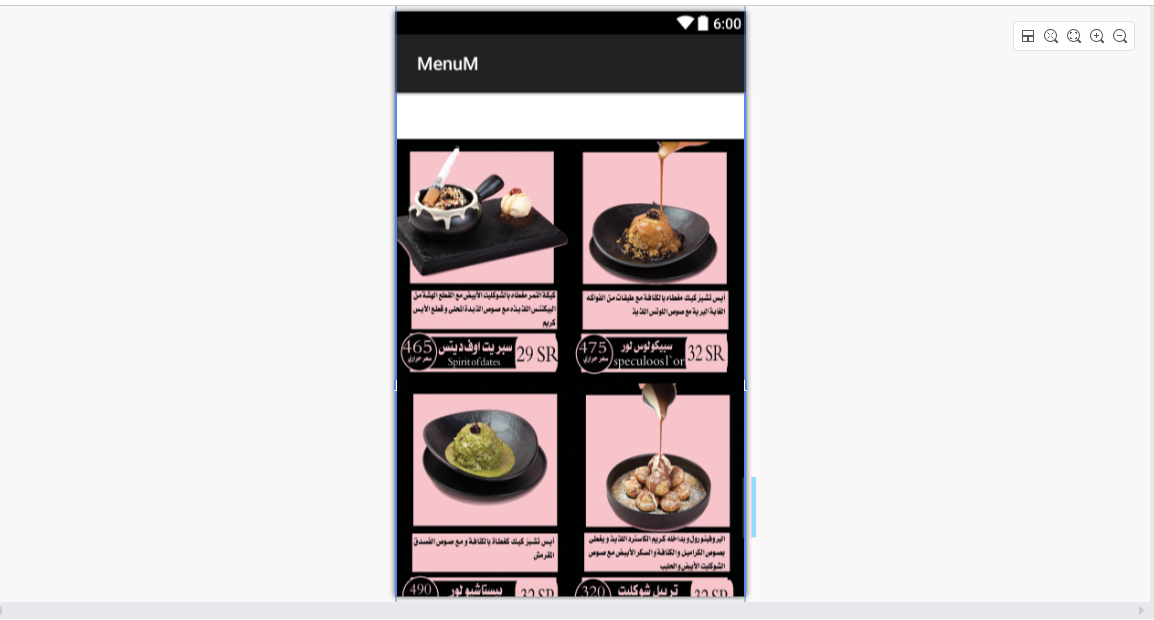
(05-12-19, 12:37 PM)محمد كريّم كتب : [ -> ]أحمد أعطينا كود layout حتى نفهم أكثر
السلام عليكم استاذ محمد كل الى توصلت ليه وهو ان المشكلة فى ان الذاكرة مش بتفتح حجم الصورة
تقريبا المظهر اللي في الصورة مش ناتج من هذا الكود
عموما الحل بإذن الله (وعن تجربة سابقة لي) انك تخلي الـ scrollView هي الـ view الرئيسية وبداخلها باقي الـ views
ملاحظة/ لو بتصمم قائمة أصناف أو سلة مشتريات أو غيرها جرب تتعامل مع الـ listView
أو إذا كنت تريد مواكبة تطور اندرويد استخدم recyclerView
(05-12-19, 05:18 PM)محمد كريّم كتب : [ -> ]تقريبا المظهر اللي في الصورة مش ناتج من هذا الكود
عموما الحل بإذن الله (وعن تجربة سابقة لي) انك تخلي الـ scrollView هي الـ view الرئيسية وبداخلها باقي الـ views
ملاحظة/ لو بتصمم قائمة أصناف أو سلة مشتريات أو غيرها جرب تتعامل مع الـ listView
أو إذا كنت تريد مواكبة تطور اندرويد استخدم recyclerView
شكرا جدا لك استاذ محمد لو امكن مثال صغير
كود :
<?xml version="1.0" encoding="utf-8"?>

<ScrollView xmlns:android="http://schemas.android.com/apk/res/android"

    android:orientation="vertical"

    android:layout_width="match_parent"

    android:layout_height="match_parent"

    android:minWidth="25px"

    android:minHeight="25px"

    android:id="@+id/scrollView1"

    android:background="@drawable/backgroundico">

            <LinearLayout

                android:orientation="vertical"

                android:minWidth="25px"

                android:minHeight="25px"

                android:layout_width="match_parent"

                android:layout_height="wrap_content"

                android:background="@android:color/transparent"

                android:id="@+id/linearLayout1">


                <ImageView

                    android:src="@drawable/ic_menu_gallery"

                    android:layout_width="match_parent"

                    android:layout_height="wrap_content"

                    android:id="@+id/imageView1" />


                <ImageView

                    android:src="@drawable/ic_menu_gallery"

                    android:layout_width="match_parent"

                    android:layout_height="wrap_content"

                    android:id="@+id/imageView2" />


                <ImageView

                    android:src="@drawable/ic_menu_gallery"

                    android:layout_width="match_parent"

                    android:layout_height="wrap_content"

                    android:id="@+id/imageView3" />

            </LinearLayout>

    </ScrollView>
السلام عليكم و رحمة الله و بركاته
التطبيق مع Xamarin.Forms

PHP كود :
<?xml version="1.0" encoding="utf-8" ?>
<ContentPage xmlns="http://xamarin.com/schemas/2014/forms"
             xmlns:x="http://schemas.microsoft.com/winfx/2009/xaml"
             xmlns:d="http://xamarin.com/schemas/2014/forms/design"
             xmlns:mc="http://schemas.openxmlformats.org/markup-compatibility/2006"
             mc:Ignorable="d"
             x:Class="App8.MainPage">

    <ScrollView>
        <StackLayout BackgroundColor="#00A04B">
            <StackLayout Orientation="Horizontal" Margin="20">
                <Image HeightRequest="72" WidthRequest="72" Aspect="AspectFill" Source="ambulance.png"/>
                <StackLayout Margin="10">
                    <Label Text="الاسعاف" TextColor="Yellow" FontSize="Large"/>
                    <Label Text="شعبة الاسعاف" TextColor="White"/>
                </StackLayout>
            </StackLayout>
            <BoxView Color ="White" HeightRequest="1"/>


            <StackLayout Orientation="Horizontal" Margin="20">
                <Image HeightRequest="72" WidthRequest="72" Aspect="AspectFill" Source="cardiology.png"/>
                <StackLayout Margin="10">
                    <Label Text="القلب" TextColor="Yellow" FontSize="Large"/>
                    <Label Text="امراض و جراحة القلب" TextColor="White"/>
                </StackLayout>
            </StackLayout>
            <BoxView Color ="White" HeightRequest="1"/>


            <StackLayout Orientation="Horizontal" Margin="20">
                <Image HeightRequest="72" WidthRequest="72" Aspect="AspectFill" Source="gynecology.png"/>
                <StackLayout Margin="10">
                    <Label Text="البولية و التناسلية" TextColor="Yellow" FontSize="Large"/>
                    <Label Text="داخلية و جراحة" TextColor="White"/>
                </StackLayout>
            </StackLayout>
            <BoxView Color ="White" HeightRequest="1"/>


            <StackLayout Orientation="Horizontal" Margin="20">
                <Image HeightRequest="72" WidthRequest="72" Aspect="AspectFill" Source="laboratory.png"/>
                <StackLayout Margin="10">
                    <Label Text="المختبر" TextColor="Yellow" FontSize="Large"/>
                    <Label Text="كيماوي - حيوي - جرثومي" TextColor="White"/>
                </StackLayout>
            </StackLayout>
            <BoxView Color ="White" HeightRequest="1"/>

            <StackLayout Orientation="Horizontal" Margin="20">
                <Image HeightRequest="50" WidthRequest="50" Aspect="AspectFill" Source="medical_bag.png"/>
                <StackLayout Margin="10">
                    <Label Text="الطوارئ" TextColor="Yellow" FontSize="Large"/>
                    <Label Text="الاسعاف الميداني" TextColor="White"/>
                </StackLayout>
            </StackLayout>
            <BoxView Color ="White" HeightRequest="1"/>

            <StackLayout Orientation="Horizontal" Margin="20">
                <Image HeightRequest="50" WidthRequest="50" Aspect="AspectFill" Source="pharmacy.png"/>
                <StackLayout Margin="10">
                    <Label Text="الصيدلية" TextColor="Yellow" FontSize="Large"/>
                    <Label Text="الصيدلية المركزية" TextColor="White"/>
                </StackLayout>
            </StackLayout>
            <BoxView Color ="White" HeightRequest="1"/>

        </StackLayout>
    </ScrollView>
</ContentPage>