26-08-22, 08:39 PM
آخر تحديث هنا
المثال مرفق فقط للتقسيم عدل على مدخلاته لاني ثبتها للسرعة او للتجربة السريعة بصراحة نسيت احذفها
توجد مشكلة موضحة بالمشروع وهي بسيطة لكني لم اوفق الى الحل
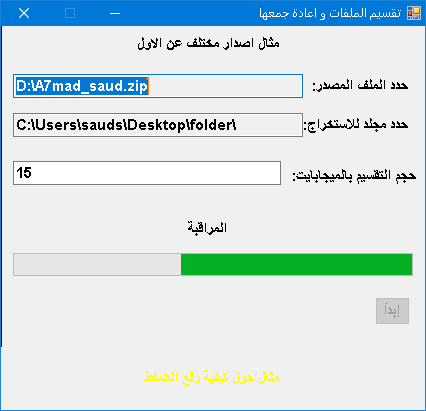
اخر ملف يفترض بعده يتم تفعيل الزر لا ادري كيف اشرح المشكلة
======================================
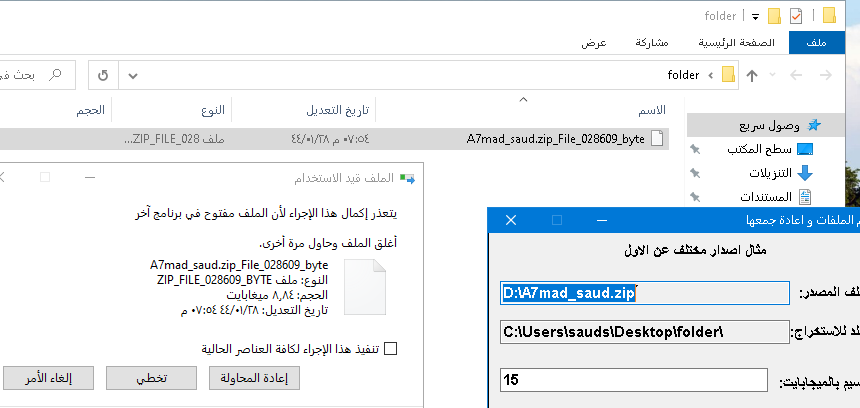
الصورة التالية لخطا حذف آخر ملف مع اني استخدم غلق وتدمير الرايتر والريدر والستريم كما هو موضح بالكود
طبعا عند غلق البرنامج يحذف ولا اقصد اني اريد الحذف لكني مستغرب انه لم ينتهي من العمل و هذا شي جنني بصراحة.
========================================
ساضع كلاس الفورم كامل هنا ان لم ترد تحميل المرفق:
PHP كود :
Imports System.IO
Public Class Form1
    Dim filemax As Long = 0
    Dim mb As Long = (1024) ^ 2
    Dim filesize As Long = 0
    Dim folder As String
    Dim th As Threading.Thread
    Private Function fl(ByVal fpath As String)
        If IO.File.Exists(fpath) = True Then
            Dim f As New IO.FileInfo(fpath)
            Return f.Length
        Else
            Return Nothing
        End If
    End Function
    Private Function folderfiles(ByVal fo As String) As Integer
        Dim dir As New IO.DirectoryInfo(fo)
        Return dir.GetFiles.Count
    End Function
    Private Sub split(ByVal fpath As String)
        If IO.File.Exists(fpath) = False Then Exit Sub
        Dim thefile As New IO.FileInfo(fpath)
        Dim fn As String = thefile.Name
        Dim fs As New FileStream(fpath, FileMode.Open)
        Dim br As New BinaryReader(fs)
        Dim i As Long = 0
        Dim n As Long = 0
        Dim mo As Long = filesize Mod filemax
nxt:
        Dim newfile As String = folder & fn & "_File_" & n.ToString("000000") & "_byte"
        p1.Invoke(Sub() p1.Maximum = filemax + (filemax / 80)) 'ماقدرت اتصرف معها زودت القيمة جدعنة بس
        For i = n To br.BaseStream.Length
            n = i
            Dim fw As New FileStream(newfile, FileMode.Append)
            Dim bw As New BinaryWriter(fw)
            bw.Write(br.ReadBytes(i))
            p1.Invoke(Sub() p1.Value = fl(newfile))
            fw.Close()
            fw.Dispose()
            bw.Close()
            bw.Dispose()
            If fl(newfile) >= filemax Then
                n += 1
                GoTo nxt
            End If
        Next ' الغريب ان الاكواد بعد هذا السطر لا يصل اليه البرنامج
        fs.Close()
        fs.Dispose()
        br.Close()
        br.Dispose()
        lbl.Invoke(Sub() lbl.Text = "تم")
        btnstart.Invoke(Sub() btnstart.Enabled = True)
    End Sub
    Private Sub Form1_FormClosing(sender As Object, e As System.Windows.Forms.FormClosingEventArgs) Handles Me.FormClosing
        If IsNothing(th) = False Then
            If th.IsAlive = True Then
                th.Abort()
            End If
        End If
    End Sub
    Private Sub Form1_Load(sender As System.Object, e As System.EventArgs) Handles MyBase.Load
        rep(Me)
    End Sub
    Private Sub Form1_MouseDown(sender As System.Object, e As System.Windows.Forms.MouseEventArgs) Handles MyBase.MouseDown, lbl.MouseDown, Label1.MouseDown, p1.MouseDown
        If e.Button = Windows.Forms.MouseButtons.Left Then
            dr = True
            ax = MousePosition.X - Left
            ay = MousePosition.Y - Top
        End If
    End Sub
    Private Sub Form1_MouseMove(sender As Object, e As System.Windows.Forms.MouseEventArgs) Handles Me.MouseMove, lbl.MouseMove, Label1.MouseMove, p1.MouseMove
        If dr Then
            Left = MousePosition.X - ax
            Top = MousePosition.Y - ay
        End If
    End Sub
    Private Sub Form1_MouseUp(sender As Object, e As System.Windows.Forms.MouseEventArgs) Handles Me.MouseUp, lbl.MouseUp, Label1.MouseUp, p1.MouseUp
        dr = False
    End Sub
    Private Sub Label2_Click(sender As System.Object, e As System.EventArgs) Handles Label2.Click
        Dim o As New OpenFileDialog
        If o.ShowDialog = Windows.Forms.DialogResult.OK Then
            txtsfile.Text = o.FileName
        End If
    End Sub
    Private Sub Label3_Click(sender As System.Object, e As System.EventArgs) Handles Label3.Click
        Dim fbd As New FolderBrowserDialog
        If fbd.ShowDialog = Windows.Forms.DialogResult.OK Then
            txtfolder.Text = fbd.SelectedPath
            If txtfolder.Text.Trim.ToLower.EndsWith("\") = False Then
                txtfolder.Text = txtfolder.Text & "\"
            End If
        End If
    End Sub
    Private Sub btnstart_Click(sender As System.Object, e As System.EventArgs) Handles btnstart.Click
        If txtsfile.Text.Trim = "" Or txtfolder.Text.Trim = "" Or txtmax.Text.Trim = "" Then Exit Sub
        Dim fl As New IO.FileInfo(txtsfile.Text)
        folder = txtfolder.Text
        filesize = fl.Length
        filemax = CLng(txtmax.Text) * mb
        th = New Threading.Thread(AddressOf split)
        btnstart.Enabled = False
        If th.IsAlive = False Then
            th.Start(txtsfile.Text)
        End If
    End Sub

End Class
ادري فيه لخبطة كثيرة لكن !
شكرا لكم مقدما.
