السلام عليكم ورحمة الله وبركاته
اولاً نحن نتعلم طريقة البرمجة من الصفر
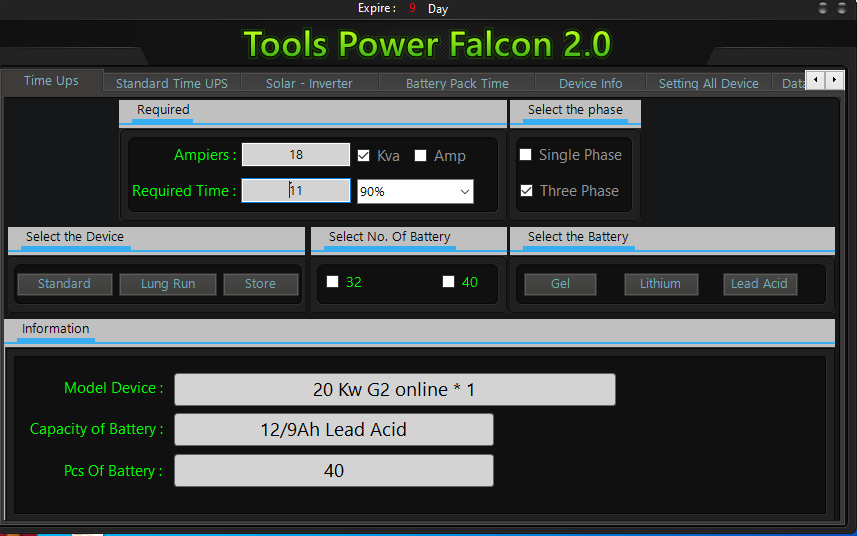
والحمدلله انجزت برنامج لشركتي للطاقه النضيفه او البديله
البرنامج عباره عن تيكست الحمل بالامبير والثاني اختيار وقت التشغيل ان كان Ups او Inverter عاكس ..
يستخرجلك الجهاز المطلوب .. وعدد البطاريات وان كان احادي الطور او ثلاثي
والحمل فيه اختيارين Ampeir او KVA
والان وصلت الى مرحله ادخل بي مكتبات ال PDf
ملاحضه : لاتعطيني .. كود كامل .. مكمل .. انا اريد اتعلم وكيف اكتب الكود بالطريقة الصحيحه بعد عده تجارب ..
اعطني
مثال : تعريف السترنك الي راح استخدمه من اي مكتبه تعطيناه ..
انا محتاج اولاً .. كود ان شاء ملف بي دي اف ..
ثانياً كود اختيار .. الصوره المراد تحويلها ..
ثالثاً تغيير حجم الصورة الى A4
رابعاً حفظ الملف في مكان انا اختاره ..
خامساً بعد الحفظ سوف انا اقوم بطباعه الملف كاملاً .. مع عده .. ملفات ..وادمجهم مع بعض ليصبح
الملف
الصفحه الاولى الصوره التي تم تحويلهاً
ثاني صفحه اسم الجهاز الذي سوف اقوم .. بانشائه .
ثالث صفحه Datasheet البطاريات
وتكون كلها في ملف واحد .. وحفظ الملف الاخير
مكان انا احدده
ولكم جزيل الشكر والتقدير .. 
(14-07-24, 02:33 PM)تركي الحلواني كتب : [ -> ]السلام عليكم ورحمة الله وبركاته
اول قم بجلب البيانات
PHP كود :
Imports System.IO
Imports iTextSharp.text
Imports iTextSharp.text.pdf
ثانياً اضف هذه الدالة
PHP كود :
Private Sub ConvertImageToPDF(imagePath As String, pdfPath As String)
    Using doc As New Document()
        Try
            Dim writer As PdfWriter = PdfWriter.GetInstance(doc, New FileStream(pdfPath, FileMode.Create))
            doc.Open()
            Dim img As iTextSharp.text.Image = iTextSharp.text.Image.GetInstance(imagePath)
            Dim originalWidth As Single = img.Width
            Dim originalHeight As Single = img.Height
            If originalWidth > originalHeight Then
                img.ScaleToFit(doc.PageSize.Width, doc.PageSize.Height)
            Else
                img.ScaleToFit(doc.PageSize.Height, doc.PageSize.Width)
            End If
            doc.NewPage()
            img.SetAbsolutePosition(0, doc.PageSize.Height - img.ScaledHeight)
            doc.Add(img)
        Catch ex As Exception
            MessageBox.Show(ex.Message)
        Finally
            doc.Close()
        End Try
    End Using
End Sub
ثالثاً في حدث الزر
PHP كود :
Private Sub Button1_Click(sender As Object, e As EventArgs) Handles Button1.Click
    Dim openFileDialog As New OpenFileDialog()
    openFileDialog.Filter = "Image Files|*.jpg;*.jpeg;*.png;*.gif;*.bmp"
    openFileDialog.Title = "Select an Image File"

    If openFileDialog.ShowDialog() = DialogResult.OK Then
        Dim imagePath As String = openFileDialog.FileName
        Dim saveFileDialog As New SaveFileDialog()
        saveFileDialog.Filter = "PDF Files|*.pdf"
        saveFileDialog.Title = "Save PDF File"

        If saveFileDialog.ShowDialog() = DialogResult.OK Then
            Dim pdfPath As String = saveFileDialog.FileName
            ConvertImageToPDF(imagePath, pdfPath)
            MessageBox.Show("Image converted to PDF successfully!")
        End If
    End If
End Sub
بارك الله بيك اخي العزيز لكن انت اعطيتني الزبده .. شكرا لك على المساعده
لكني ليس قوي في استدعاء الدوال ياريت لو تعطيني مثالاً .. بارك الله فيك .
البيانات في الاعلاء هيا مثال
انسخها كما هي
وقم بعمل زر في النموذج وجرب
ممتاز رائع .. بارك الله فيك
ممكن كود تحويل ملفات الورد الى بي دي اف ان أمكن
الزميل
PHP كود :
http://vb4arb.com/vb/member.php?action=profile&uid=31301
برجاء وضع المثال كامل انا احتاجه والاخرين
(22-07-24, 04:59 PM)abu ammar كتب : [ -> ]ممتاز رائع .. بارك الله فيك
ممكن كود تحويل ملفات الورد الى بي دي اف ان أمكن
اليك بمثال لتحويل ملف وورد الى بي دي اف
PHP كود :
Public Class Form1
    Public Sub ConvertToPDF(sInputPath As String, sOutputPath As String)
        'type to be saved
        Const wdFormatPDF As Integer = 17

        Dim wdApp As Object
        Dim wdDoc As Object

        'open the file
        wdApp = CreateObject("Word.Application")
        wdDoc = wdApp.Documents.Open(sInputPath)

        'convert it
        Call wdDoc.SaveAs2(sOutputPath, wdFormatPDF)

        'close and clean
        wdDoc.Close()
        wdApp.Quit()

        wdDoc = Nothing
        wdApp = Nothing
    End Sub
    Private Sub Button1_Click(sender As Object, e As EventArgs) Handles Button1.Click
        Dim openFileDialog As New OpenFileDialog()
        openFileDialog.Filter = "Word Files|*.docx"
        If openFileDialog.ShowDialog() = DialogResult.OK Then
            Dim wordPath As String = openFileDialog.FileName
            Dim saveFileDialog As New SaveFileDialog()
            saveFileDialog.Filter = "PDF Files|*.pdf"
            saveFileDialog.Title = "Save PDF File"

            If saveFileDialog.ShowDialog() = DialogResult.OK Then
                Dim pdfPath As String = saveFileDialog.FileName
                ConvertToPDF(wordPath, pdfPath)
                MessageBox.Show("the word document has been converted to PDF successfully!")
            End If
        End If
    End Sub
End Class
إقتباس :abu ammar
الزميل برجاء وضع المثال لاني ارغب في طباعة ملف كريستال بمقاسات يتحكم فيها العميل