منتدى فيجوال بيسك لكل العرب | منتدى المبرمجين العرب

نسخة كاملة : اين الخطأ هنا ..
أنت حالياً تتصفح نسخة خفيفة من المنتدى . مشاهدة نسخة كاملة مع جميع الأشكال الجمالية .
السلام عليكم
ما الحل يا اخوان
https://top4top.io/downloadf-3299ste8m1-rar.html
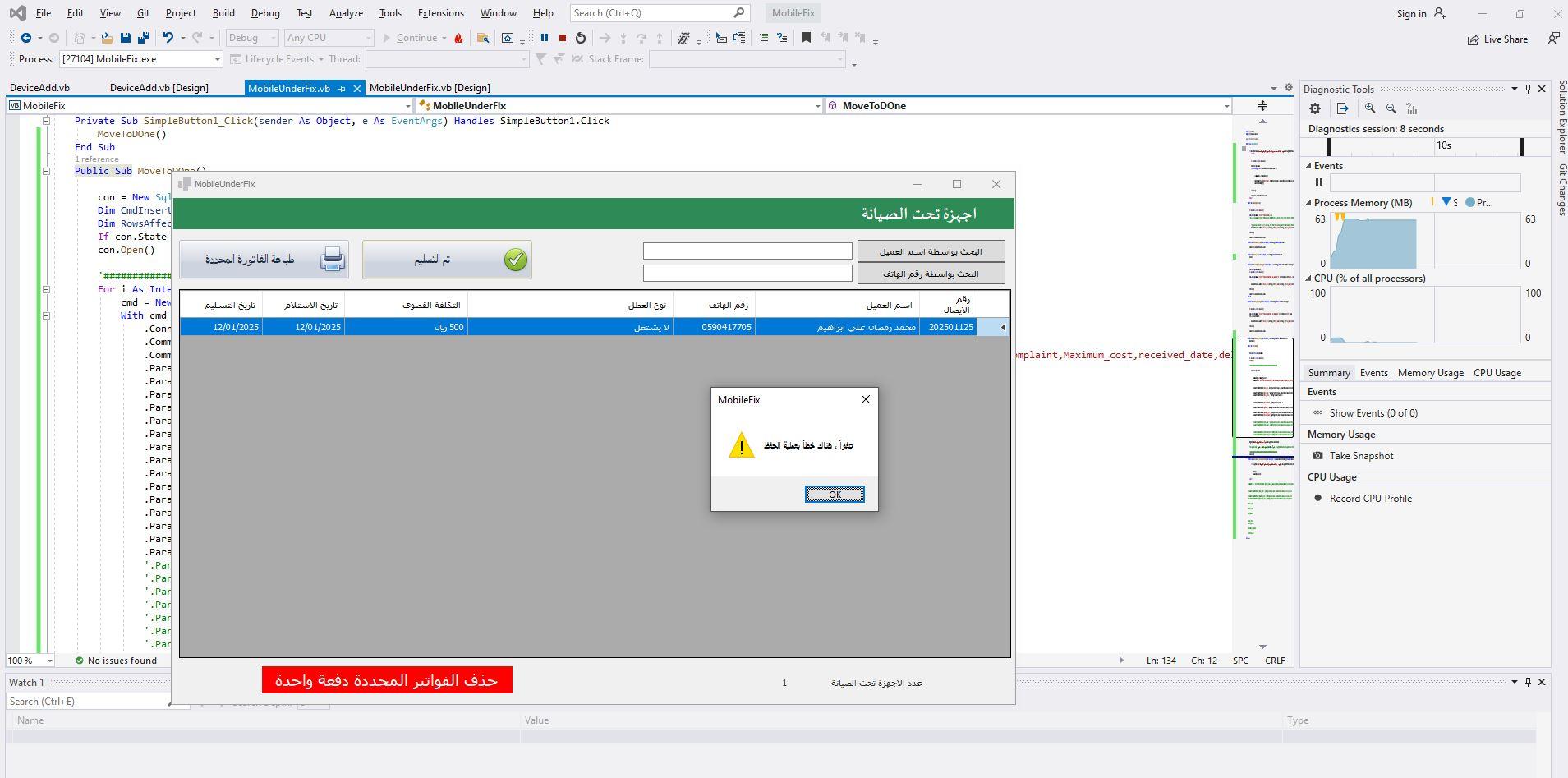
كود :
Public Sub MoveToDOne()

       con = New SqlConnection(cs)
       Dim CmdInsert As New SqlCommand
       Dim RowsAffected As Integer = 0
       If con.State = 1 Then con.Close()
       con.Open()

       '################################################################
       For i As Integer = 0 To DataGridView2.Rows.Count - 1
           cmd = New SqlCommand
           With cmd
               .Connection = con
               .CommandType = CommandType.Text
               .CommandText = "Insert Into DeviceDone(device_code,cus_name,device_name,cus_phone,cus_address,Brand,model,Place_reform,serial_device,problem,Customer_Complaint,Maximum_cost,received_date,delivery_date)values(@device_code,@cus_name,@device_name,@cus_phone,@cus_address,@Brand,@model,@Place_reform,@serial_device,@problem,@Customer_Complaint,@Maximum_cost,@received_date,@delivery_date)"
               .Parameters.Clear()
               .Parameters.AddWithValue("@device_code", SqlDbType.Int).Value = DataGridView2.Rows(i).Cells(0).Value
               .Parameters.AddWithValue("@cus_name", SqlDbType.VarChar).Value = DataGridView2.Rows(i).Cells(1).Value
               .Parameters.AddWithValue("@device_name", SqlDbType.VarChar).Value = 0
               .Parameters.AddWithValue("@cus_phone", SqlDbType.VarChar).Value = DataGridView2.Rows(i).Cells(2).Value
               .Parameters.AddWithValue("@cus_address", SqlDbType.VarChar).Value = 0
               .Parameters.AddWithValue("@Brand", SqlDbType.VarChar).Value = 0
               .Parameters.AddWithValue("@model", SqlDbType.VarChar).Value = 0
               .Parameters.AddWithValue("@Place_reform", SqlDbType.VarChar).Value = 0
               .Parameters.AddWithValue("@serial_device", SqlDbType.VarChar).Value = 0
               .Parameters.AddWithValue("@problem", SqlDbType.VarChar).Value = DataGridView2.Rows(i).Cells(3).Value
               .Parameters.AddWithValue("@Customer_Complaint", SqlDbType.VarChar).Value = 0
               .Parameters.AddWithValue("@Maximum_cost", SqlDbType.VarChar).Value = DataGridView2.Rows(i).Cells(4).Value
               .Parameters.AddWithValue("@received_date", SqlDbType.Date).Value = DataGridView2.Rows(i).Cells(5).Value
               .Parameters.AddWithValue("@delivery_date", SqlDbType.Date).Value = DataGridView2.Rows(i).Cells(6).Value
               '.Parameters.AddWithValue("@device_code", SqlDbType.Int).Value = DataGridView2.Rows(i).Cells(0).Value
               '.Parameters.AddWithValue("@cus_name", SqlDbType.VarChar).Value = DataGridView2.Rows(i).Cells(1).Value
               '.Parameters.AddWithValue("@cus_phone", SqlDbType.VarChar).Value = DataGridView2.Rows(i).Cells(2).Value
               '.Parameters.AddWithValue("@problem", SqlDbType.VarChar).Value = DataGridView2.Rows(i).Cells(3).Value
               '.Parameters.AddWithValue("@Maximum_cost", SqlDbType.Date).Value = DataGridView2.Rows(i).Cells(4).Value
               '.Parameters.AddWithValue("@received_date", SqlDbType.Date).Value = DataGridView2.Rows(i).Cells(5).Value
               '.Parameters.AddWithValue("@delivery_date", SqlDbType.Date).Value = DataGridView2.Rows(i).Cells(6).Value
           End With
       Next
       MsgBox(" عفواً ، هناك خطأ بعملية الحفظ", MessageBoxIcon.Exclamation)

       'MessageBox.Show(" عفواً ، هناك خطأ بعملية الحفظ", "تنبيه", MessageBoxButtons.OK, MessageBoxIcon.Error, MessageBoxDefaultButton.Button1, MessageBoxOptions.RightAlign)
       Exit Sub
       '################################################################
       con.Close()
   End Sub


Public Sub MoveToDOne()

con = New SqlConnection(cs)
Dim CmdInsert As New SqlCommand
Dim RowsAffected As Integer = 0
If con.State = 1 Then con.Close()
con.Open()

'################################################################
For i As Integer = 0 To DataGridView2.Rows.Count - 1
cmd = New SqlCommand
With cmd
.Connection = con
.CommandType = CommandType.Text
.CommandText = "Insert Into DeviceDone(device_code,cus_name,device_name,cus_phone,cus_address,Brand,model,Place_reform,serial_device,problem,Customer_Complaint,Maximum_cost,received_date,delivery_date)values(@device_code,@cus_name,@device_name,@cus_phone,@cus_address,@Brand,@model,@Place_reform,@serial_device,@problem,@Customer_Complaint,@Maximum_cost,@received_date,@delivery_date)"
.Parameters.Clear()
.Parameters.AddWithValue("@device_code", SqlDbType.Int).Value = DataGridView2.Rows(i).Cells(0).Value
.Parameters.AddWithValue("@cus_name", SqlDbType.VarChar).Value = DataGridView2.Rows(i).Cells(1).Value
.Parameters.AddWithValue("@device_name", SqlDbType.VarChar).Value = 0
.Parameters.AddWithValue("@cus_phone", SqlDbType.VarChar).Value = DataGridView2.Rows(i).Cells(2).Value
.Parameters.AddWithValue("@cus_address", SqlDbType.VarChar).Value = 0
.Parameters.AddWithValue("@Brand", SqlDbType.VarChar).Value = 0
.Parameters.AddWithValue("@model", SqlDbType.VarChar).Value = 0
.Parameters.AddWithValue("@Place_reform", SqlDbType.VarChar).Value = 0
.Parameters.AddWithValue("@serial_device", SqlDbType.VarChar).Value = 0
.Parameters.AddWithValue("@problem", SqlDbType.VarChar).Value = DataGridView2.Rows(i).Cells(3).Value
.Parameters.AddWithValue("@Customer_Complaint", SqlDbType.VarChar).Value = 0
.Parameters.AddWithValue("@Maximum_cost", SqlDbType.VarChar).Value = DataGridView2.Rows(i).Cells(4).Value
.Parameters.AddWithValue("@received_date", SqlDbType.Date).Value = DataGridView2.Rows(i).Cells(5).Value
.Parameters.AddWithValue("@delivery_date", SqlDbType.Date).Value = DataGridView2.Rows(i).Cells(6).Value
'.Parameters.AddWithValue("@device_code", SqlDbType.Int).Value = DataGridView2.Rows(i).Cells(0).Value
'.Parameters.AddWithValue("@cus_name", SqlDbType.VarChar).Value = DataGridView2.Rows(i).Cells(1).Value
'.Parameters.AddWithValue("@cus_phone", SqlDbType.VarChar).Value = DataGridView2.Rows(i).Cells(2).Value
'.Parameters.AddWithValue("@problem", SqlDbType.VarChar).Value = DataGridView2.Rows(i).Cells(3).Value
'.Parameters.AddWithValue("@Maximum_cost", SqlDbType.Date).Value = DataGridView2.Rows(i).Cells(4).Value
'.Parameters.AddWithValue("@received_date", SqlDbType.Date).Value = DataGridView2.Rows(i).Cells(5).Value
'.Parameters.AddWithValue("@delivery_date", SqlDbType.Date).Value = DataGridView2.Rows(i).Cells(6).Value
End With
Next
MsgBox(" عفواً ، هناك خطأ بعملية الحفظ", MessageBoxIcon.Exclamation)

'MessageBox.Show(" عفواً ، هناك خطأ بعملية الحفظ", "تنبيه", MessageBoxButtons.OK, MessageBoxIcon.Error, MessageBoxDefaultButton.Button1, MessageBoxOptions.RightAlign)
Exit Sub
'################################################################
con.Close()
End Sub
ممكن لا أعرف محتوى مشروعك
لكني لا أرى بالكود أمر الحفظ
كود :
           .Parameters.AddWithValue("@received_date", SqlDbType.Date).Value = CDate(DataGridView2.Rows(i).Cells(5).Value)
               .Parameters.AddWithValue("@delivery_date", SqlDbType.Date).Value = CDate(DataGridView2.Rows(i).Cells(6).Value)

           End With
       Next


       If Con.State = 1 Then Con.Close()
       Con.Open()
       Cmd.ExecuteNonQuery()
       Con.Close()
       MsgBox("تم إضافة السجل بنجاح", MsgBoxStyle.Information, "حفظ")

       Cmd = Nothing
الجنون ان الكود يعمل بشكل جيد
ولكن عند التجربة اكثر من مرة
تظهر رسالة الخطأ
ولكن يتم تنفيذ المطلوب
ملاحظة صغيرة وتتكرر في الكود الخاص بك بكثير متغيرات
كود :
.Parameters.AddWithValue("@Place_reform", SqlDbType.VarChar).Value = 0
نوع النتغير نصي وانت اعطيه قيمة 0 اذا كنت تريد اعطاءه هذه القيمة صفر يجب ان تكون هكذا 
كود :
"0"

ملاحظة اخرى
تهيئة
كود :
SqlCommand
داخل الحلقة
  • يتم تهيئة
    cmd
  • داخل الحلقة ولكنه لا يتم تنفيذه بواسطة استدعاء
    cmd.ExecuteNonQuery
مشكور جزاكم الله خير اخوتي
تم حل المشكلة وهي خطأ مني
انا قمت بتحديد رسالة خطأ
تشتت الافكار
الكود يعمل بشكل جيد
وهذا هو للحاجة
كود :
Public Sub MoveToDOne()
       Try
           con = New SqlConnection(cs)
           Dim CmdInsert As New SqlCommand
           Dim RowsAffected As Integer = 0
           If con.State = 1 Then con.Close()
           con.Open()

           '################################################################
           For i As Integer = 0 To DataGridView2.Rows.Count - 1
               cmd = New SqlCommand
               With cmd
                   .Connection = con
                   .CommandType = CommandType.Text
                   .CommandText = "Insert Into DeviceDone(device_code,cus_name,device_name,cus_phone,cus_address,Brand,model,Place_reform,serial_device,problem,Customer_Complaint,Maximum_cost,received_date,delivery_date)values(@device_code,@cus_name,@device_name,@cus_phone,@cus_address,@Brand,@model,@Place_reform,@serial_device,@problem,@Customer_Complaint,@Maximum_cost,@received_date,@delivery_date)"
                   .Parameters.Clear()
                   .Parameters.AddWithValue("@device_code", SqlDbType.Int).Value = Get_Order_No()
                   .Parameters.AddWithValue("@cus_name", SqlDbType.VarChar).Value = DataGridView2.SelectedRows(i).Cells(1).Value
                   .Parameters.AddWithValue("@device_name", SqlDbType.VarChar).Value = DataGridView2.SelectedRows(i).Cells(3).Value
                   .Parameters.AddWithValue("@cus_phone", SqlDbType.VarChar).Value = DataGridView2.SelectedRows(i).Cells(2).Value
                   .Parameters.AddWithValue("@cus_address", SqlDbType.VarChar).Value = "0"
                   .Parameters.AddWithValue("@Brand", SqlDbType.VarChar).Value = "0"
                   .Parameters.AddWithValue("@model", SqlDbType.VarChar).Value = "0"
                   .Parameters.AddWithValue("@Place_reform", SqlDbType.VarChar).Value = "0"
                   .Parameters.AddWithValue("@serial_device", SqlDbType.VarChar).Value = "0"
                   .Parameters.AddWithValue("@problem", SqlDbType.VarChar).Value = DataGridView2.SelectedRows(i).Cells(4).Value
                   .Parameters.AddWithValue("@Customer_Complaint", SqlDbType.VarChar).Value = "0"
                   .Parameters.AddWithValue("@Maximum_cost", SqlDbType.VarChar).Value = DataGridView2.SelectedRows(i).Cells(5).Value
                   .Parameters.AddWithValue("@received_date", SqlDbType.Date).Value = DataGridView2.SelectedRows(i).Cells(6).Value
                   .Parameters.AddWithValue("@delivery_date", SqlDbType.Date).Value = DataGridView2.SelectedRows(i).Cells(7).Value
                   '.Parameters.AddWithValue("@device_code", SqlDbType.Int).Value = DataGridView2.Rows(i).Cells(0).Value
                   '.Parameters.AddWithValue("@cus_name", SqlDbType.VarChar).Value = DataGridView2.Rows(i).Cells(1).Value
                   '.Parameters.AddWithValue("@cus_phone", SqlDbType.VarChar).Value = DataGridView2.Rows(i).Cells(2).Value
                   '.Parameters.AddWithValue("@problem", SqlDbType.VarChar).Value = DataGridView2.Rows(i).Cells(3).Value
                   '.Parameters.AddWithValue("@Maximum_cost", SqlDbType.Date).Value = DataGridView2.Rows(i).Cells(4).Value
                   '.Parameters.AddWithValue("@received_date", SqlDbType.Date).Value = DataGridView2.Rows(i).Cells(5).Value
                   '.Parameters.AddWithValue("@delivery_date", SqlDbType.Date).Value = DataGridView2.Rows(i).Cells(6).Value
                   con.Open()
                   .ExecuteNonQuery()
               End With
           Next
           '################################################################
           con.Close()
       Catch ex As Exception
           MsgBox(" تمت عملية الحفظ بنجاح", MessageBoxIcon.Information)
           'MessageBox.Show(" عفواً ، هناك خطأ بعملية الحفظ", "تنبيه", MessageBoxButtons.OK, MessageBoxIcon.Error, MessageBoxDefaultButton.Button1, MessageBoxOptions.RightAlign)
           'Exit Sub
       End Try
       delete()
   End Sub


كود :
Private Sub delete()
       If MessageBox.Show("هل أنت متأكد تم استلام الجهاز من قبل العميل؟", "تنبيه", MessageBoxButtons.YesNo, MessageBoxIcon.Question, MessageBoxDefaultButton.Button2) = Windows.Forms.DialogResult.No Then
           Exit Sub
       Else
           con = New SqlConnection(cs)
           If con.State = 1 Then con.Close()
           con.Open()
           cmd = New SqlCommand
           For i As Integer = 0 To DataGridView2.SelectedRows.Count - 1

               With cmd
                   .CommandType = CommandType.Text
                   Dim comd As New SqlCommand("Delete from DeviceAdd Where device_code=@device_code", con)
                   comd.Parameters.Add("@device_code", SqlDbType.Int).Value = DataGridView2.SelectedRows(i).Cells(0).Value
                   comd.ExecuteNonQuery()
               End With
           Next
           con.Close()
           LoadAllQuick_Sale()
           Count.Text = DataGridView2.Rows.Count
       End If
   End Sub
لكنه يعمل بشكل جيد ؟