
+- منتدى فيجوال بيسك لكل العرب | منتدى المبرمجين العرب (http://vb4arb.com/vb)
+-- قسم : قسم لغة السي شارب C#.NET (http://vb4arb.com/vb/forumdisplay.php?fid=175)
+--- قسم : قسم دورات C#.NET (http://vb4arb.com/vb/forumdisplay.php?fid=178)
+--- الموضوع : Your first line of C# code اكتب اول كود في السي شارب (/showthread.php?tid=13320)
Your first line of C# code اكتب اول كود في السي شارب - أبو عمر - 23-09-15
السلام عليكم
كل عام وأنتم بخير
الموضوع برمته منقول كما نوهت في المشاركة السابقة وسامحوني احب اللغة العربية كثيرا وعلى استعداد بإذن الله لمناظرة
اكبر دكاترة اللغة العربية وبثقة !
ولكني في مجال البرمجة خصوصا عندما تقابلني شاشة الكيمبيوتر احب ان اتعلم لغة اخرى كالانجليزية والاسبانية والبرتغالية
وهممت بالكورية لكني لم اجد لها معلما متواضعا !!!
الان هذه المواضيع في الشي شارب ليست موجهة إلا للمبتدئين فيها امثالي بالفعل انا في محو الامية قد اجد من يأخذ بيدي وقد أجد من يسخر او يثبط الهمم لكنني ماض قدماً فالمرء متعلم حتى يموت
لم اجد برنامج قوياً تمت برمجته على البيسك مع حبي لها خصوصا انني في المحرر كأنني اتخاطب مع شخص عاقل وليس مع الة
If then
لكن الحب لا يغني عن في العلم شيئا .... يكفي هرج؟ طيب
الان Your first line of C# code
افتح الفيجوال واختر console application اقل شي تابع الصور ترجمة جوجل تجيب المرض
![[صورة مرفقة: program_tab.gif]](http://www.homeandlearn.co.uk/csharp/images/csharp_2013/console/program_tab.gif)
For now, ignore the lines that start with using as we'll get to them later in the course. But they add references to in-built code. The namespace line includes the name of your application. A namespace is a way to group related code together. Again, don't worry about the term namespace, as you'll learn about these later.
The thing that's important above is the word class. All your code will be written in classes. This one is called Program (you can call them anything you like, as long as C# hasn't taken the word for itself). But think of a class as a segment of code that you give a name to.
Inside of the class called Program there is this code:
static void Main(string[ ] args)
{
}
This piece of code is something called a Method. The name of the Method above is Main. When you run your programme, C# looks for a Method called Main. It uses the Main Method as the starting point for your programmes. It then executes any code between those two curly brackets. The blue words above are all special words - keywords. You'll learn more about them in later chapters.
But position your cursor after the first curly bracket, and then hit the enter key on your keyboard:

The single line of code we'll write is this (but don't write it yet):
Console.WriteLine("Hello C Sharp!");
First, type the letter "C". You'll see a popup menu. This popup menu is called the IntelliSense menu. It tries to guess what you want, and allows you to quickly add the item from the list. But it should look like this, after you have typed a capital letter "C":![[صورة مرفقة: code_console.gif]](http://www.homeandlearn.co.uk/csharp/images/csharp_2013/console/code_console.gif)

![[صورة مرفقة: code_console2.gif]](http://www.homeandlearn.co.uk/csharp/images/csharp_2013/console/code_console2.gif)
![[صورة مرفقة: code_console3.gif]](http://www.homeandlearn.co.uk/csharp/images/csharp_2013/console/code_console3.gif)
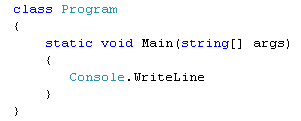
![[صورة مرفقة: code_console4.gif]](http://www.homeandlearn.co.uk/csharp/images/csharp_2013/console/code_console4.gif)
"Hello C Sharp!"
Don't forget the double quotes at the start and end. These tell C# that you want text. Your code will look like this:

The thing we've missed out is a semicolon. All complete lines of code in C# must end with a semicolon. Miss one out and you'll get error messages. Type the semicolon at the end and the red wiggly line will go away. Your code should now look like this:

(If you want, you can change these colours. From the menu bar at the top, click Tools > Options. Under Environment, click Fonts and Colors.)
Time now to Build and Run your code!
طيب الان تالع كيف تبني هذا الكود اللي انت سويته
بالمناسبة الشرح تفصيلي فوق وممل يتكلم حتى عن تعابير الالوان المختلفة
ما علينا نكمل مع الاجنبي هذا
How to Run your C# Program
كيف تشغل برنامجك؟
You can test your programme a number of ways. First, though, it has to be built. This is when everything is checked to see if there are any errors. Try this:
- From the View menu at the top of Visual C# Express, click Output. You'll see a window appear at the bottom. (In C# 2010, if you can't see an Output entry, click the Tools menu. From the Tools menu, select Settings > Expert Settings. The Output menu item should then appear on the View menu.)
- From the Build menu at the top of Visual C# Express, click Build Solution
- You should see the following report:

Build: 1 succeeded or up-to-date, 0 failed, 0 skipped
That's telling you that everything is OK.Now try this:
- Delete the semicolon from the end of your line of code
- Click Build > Build Solution again
- Examine the output window
Compile complete -- 1 errors, 0 warnings
Build: 0 succeeded or up-to-date, 1 failed, 0 skipped
So it's telling you that it couldn't build your solution because there was 1 error.
Put the semicolon back at the end of the line. Now click Debug from the menu at the top of Visual C# Express. From the Debug menu, select Start Debugging.
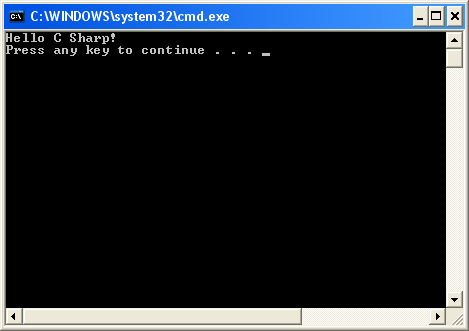
You should see a black DOS window appear and then disappear. Your programme has run successfully!
To actually see your line of text, click Debug > Start Without Debugging. You should now see this:
![[صورة مرفقة: solution_explorer_debug.gif]](http://www.homeandlearn.co.uk/csharp/images/csharp_2013/console/solution_explorer_debug.gif)
But that's enough of Console Applications - we'll move on to creating Windows Applications.
اوكي الى هنا الرجال يقول هذا كافي في الكونسول وتعال نشتغل واجهات ويندوز
بالمناسبة الشرح على فيجوال استوديو 2010 وشكل الويندوز ملينيوم او 98
شايفين كيف احنا فالحين بس في اقتنا احدث الاجهزة والانظمة؟

الدرس القادم اول تطبيق على الويندوز فوم
تجده هنا
http://vb4arb.com/vb/thread-13298.html
ريقي نشف من كثر الهرج
في امان الباري