
+- منتدى فيجوال بيسك لكل العرب | منتدى المبرمجين العرب (http://vb4arb.com/vb)
+-- قسم : قسم لغة الفيجوال بيسك VB.NET (http://vb4arb.com/vb/forumdisplay.php?fid=182)
+--- قسم : قسم اسئلة VB.NET (http://vb4arb.com/vb/forumdisplay.php?fid=183)
+--- الموضوع : [سؤال] البحث بالداتاجريدفيو (/showthread.php?tid=27962)
البحث بالداتاجريدفيو - allo5_800 - 20-12-18
السلام عليكم ورحمة الله وبركاته
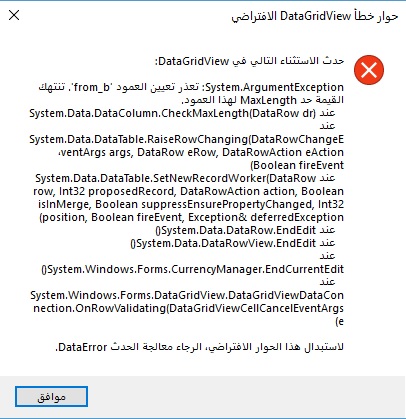
ادي تقرير بالداتاجريد فيو وفيه زر عند وضع رقم الحركه والضغط عليه يقوم باظهار الصف واخفاء الباقي المشكله عند تغيير الرقم والضغط على الزر مره اخرى تاتي هذه الرساله
RE: البحث بالداتاجريدفيو - elgokr - 20-12-18
وعليكم السلام ورحمة الله وبركاته
اتمنى ارفاق سورس للمثال الذى تعمل عليه
حتى يتم مراجعة الامر وتوضيح لك المشكلة تماماً
وتوضيح الطريقة الصحيحة لاستخدام الفلتر بناءاً لما تستخدمه من طريقة لديك
تحياتى لك
وتمنياتى لك التوفيق
RE: البحث بالداتاجريدفيو - allo5_800 - 20-12-18
كود :
ublic Class riport1


    Private Sub riport1_Load(sender As Object, e As EventArgs) Handles MyBase.Load

        If My.Settings.TPY = "M" Then


            Load_send()

            FormatDGV_send(DGV_send)

            DGV_send.Sort(DGV_send.Columns(0), System.ComponentModel.ListSortDirection.Ascending)

            Load_NOTE4()

            color_note1()

            color_note3()

            color_note2()

        Else

            If My.Settings.TPY = "E" Then


                Load_send()

                FormatDGV_send(DGV_send)

                edatToolStripMenuItem.Enabled = False

                DGV_send.Sort(DGV_send.Columns(0), System.ComponentModel.ListSortDirection.Ascending)


                Load_NOTE4()

                color_note1()

                color_note3()

                color_note2()

            End If

        End If

    End Sub


    Public DT_send As New DataTable

    Public Sub Load_send()

        DGV_send.DataSource = Nothing

        DGV_send.Rows.Clear()

        DT_send.Clear()

        Dim Da As New SqlDataAdapter("Select id,date1,from_b,to_b,note_m,note1,note2,note3  From send ", Con) '

        Try

            If Con.State = 1 Then Con.Close()

            Con.Open()

            Da.Fill(DT_send)

            Con.Close()

            Da = Nothing

        Catch ex As Exception

            MessageBox.Show(ex.Message)

            Con.Close()

        End Try

        If DT_send.Rows.Count <> 0 Then

            With DGV_send

                .DataSource = DT_send


                'Form1.BindingContext(DT_send).Position = Form1.BindingContext(DT_send).Count - 1

            End With

        End If

    End Sub


    Private Sub Load_note1()


        For i As Integer = 0 To DGV_send.Rows.Count - 2 Step +1

            If DGV_send.Rows(i).Cells(5).Value = "1" Then

                DGV_send.Rows(i).Cells(5).Value = "تم الارسال"


            End If

        Next

    End Sub

    Private Sub Load_note2()

        For i As Integer = 0 To DGV_send.Rows.Count - 2 Step +1

            If DGV_send.Rows(i).Cells(6).Value = "0" Then

                DGV_send.Rows(i).Cells(6).Value = "قيد التسليم"

            Else

                If DGV_send.Rows(i).Cells(6).Value = "1" Then

                    DGV_send.Rows(i).Cells(6).Value = "تم التسليم"

                End If

            End If

        Next

    End Sub

    Private Sub Load_note3()

        For i As Integer = 0 To DGV_send.Rows.Count - 2 Step +1

            If DGV_send.Rows(i).Cells(7).Value = "0" Then

                DGV_send.Rows(i).Cells(7).Value = "قيد التاكيد"

            Else

                If DGV_send.Rows(i).Cells(7).Value = "1" Then

                    DGV_send.Rows(i).Cells(7).Value = "تم التاكيد"

                End If

            End If

        Next

    End Sub

    Private Sub Load_branch1()

        For i As Integer = 0 To DGV_send.Rows.Count - 2 Step +1

            If DGV_send.Rows(i).Cells(3).Value = "01" Then

                DGV_send.Rows(i).Cells(3).Value = "فرع التحليه"

            Else

                If DGV_send.Rows(i).Cells(3).Value = "02" Then

                    DGV_send.Rows(i).Cells(3).Value = "فرع العليا"

                Else

                    If DGV_send.Rows(i).Cells(3).Value = "03" Then

                        DGV_send.Rows(i).Cells(3).Value = "الادارة"

                    End If

                    End If

            End If

        Next

    End Sub


    Private Sub Load_branch2()

        For i As Integer = 0 To DGV_send.Rows.Count - 2 Step +1

            If DGV_send.Rows(i).Cells(2).Value = "01" Then

                DGV_send.Rows(i).Cells(2).Value = "فرع التحليه"

            Else

                If DGV_send.Rows(i).Cells(2).Value = "02" Then

                    DGV_send.Rows(i).Cells(2).Value = "فرع العليا"

                Else

                    If DGV_send.Rows(i).Cells(3).Value = "03" Then

                        DGV_send.Rows(i).Cells(3).Value = "الادارة"

                    End If

                End If

            End If

        Next

    End Sub


    Public Sub Load_NOTE4()

        Load_note1()

        Load_note2()

        Load_note3()

        Load_branch1()

        Load_branch2()

    End Sub

    Private Sub edatToolStripMenuItem_Click(sender As Object, e As EventArgs) Handles edatToolStripMenuItem.Click

        Dim i As Integer


        edatcon.Show()


        i = DGV_send.SelectedCells(0).RowIndex


        edatcon.TextBox1.Text = DGV_send.Rows(i).Cells(0).Value.ToString()

        edatcon.DateTimePicker1.Text = DGV_send.Rows(i).Cells(1).Value.ToString()

        edatcon.ComboBox1.Text = DGV_send.Rows(i).Cells(2).Value.ToString()

        edatcon.ComboBox2.Text = DGV_send.Rows(i).Cells(3).Value.ToString()

        edatcon.TextBox3.Text = DGV_send.Rows(i).Cells(4).Value.ToString()

        edatcon.TextBox9.Text = DGV_send.Rows(i).Cells(5).Value.ToString()

        edatcon.TextBox10.Text = DGV_send.Rows(i).Cells(6).Value.ToString()

        edatcon.TextBox11.Text = DGV_send.Rows(i).Cells(7).Value.ToString()

        edatcon.Load_sand_iteme()

        edatcon.renameresize()

    End Sub


    Public Sub color_note1()

        For i As Integer = 0 To Me.DGV_send.Rows.Count - 1

            If Me.DGV_send.Rows(i).Cells("note1").Value = "تم الارسال" Then

                Me.DGV_send.Rows(i).Cells("note1").Style.BackColor = Color.LimeGreen


            End If

        Next

    End Sub

    Public Sub color_note2()

        For i As Integer = 0 To Me.DGV_send.Rows.Count - 1


            If Me.DGV_send.Rows(i).Cells("note2").Value = "قيد التسليم" Then

                Me.DGV_send.Rows(i).Cells("note2").Style.BackColor = Color.Red

            ElseIf Me.DGV_send.Rows(i).Cells("note2").Value = "تم التسليم" Then

                Me.DGV_send.Rows(i).Cells("note2").Style.BackColor = Color.LimeGreen

            End If

        Next

    End Sub

    Public Sub color_note3()

        For i As Integer = 0 To Me.DGV_send.Rows.Count - 1

            If Me.DGV_send.Rows(i).Cells("note3").Value = "قيد التاكيد" Then

                Me.DGV_send.Rows(i).Cells("note3").Style.BackColor = Color.Red

            ElseIf Me.DGV_send.Rows(i).Cells("note3").Value = "تم التاكيد" Then

                Me.DGV_send.Rows(i).Cells("note3").Style.BackColor = Color.LimeGreen

            End If

        Next

    End Sub

    Private Sub DGV_send_ColumnAdded(sender As Object, e As DataGridViewColumnEventArgs) Handles DGV_send.ColumnAdded

        e.Column.SortMode = DataGridViewColumnSortMode.NotSortable

    End Sub

    Private Sub Search_send()


        Dim cmd As New SqlClient.SqlCommand

        Dim DR_send As SqlClient.SqlDataReader

        Dim DTS_send As New DataTable

        Dim MySqlSreach As String

        MySqlSreach = "Select id,date1,from_b,to_b,note_m,note1,note2,note3 From send Where id = " & Txtid.Text & ""

        Try

            If con.State = ConnectionState.Open Then con.Close()

            con.Open()

            Cmd.Connection = Con

            Cmd.CommandType = Data.CommandType.Text

            Cmd.CommandText = MySqlSreach

            DTS_send.Load(Cmd.ExecuteReader)

            DR_send = Cmd.ExecuteReader

            DR_send.Read()

            If DR_send.HasRows Then


                Me.Txtid.Text = DR_send("id").ToString

                'Me.Dtpdate1.Value = DR_send("date1").ToString

                'Me.Txtfrom_b.Text = DR_send("from_b").ToString

                'Me.Txtto_b.Text = DR_send("to_b").ToString

                'Me.Txtnote_m.Text = DR_send("note_m").ToString

                'Me.Txtnote1.Text = DR_send("note1").ToString

                'Me.Txtnote2.Text = DR_send("note2").ToString

                'Me.Txtnote3.Text = DR_send("note3").ToString


                DGV_send.DataSource = DTS_send

                DR_send.Close()

            Else

                DR_send.Close()

                'ClearText()

                DGV_send.DataSource = Nothing

                DGV_send.Rows.Clear()

                MsgBox(" عفواً . لا يوجد بيانات ", MsgBoxStyle.Information)

            End If

        Catch ex As Exception

            MessageBox.Show(ex.Message)

            Con.Close()

        End Try

    End Sub


    Private Sub Button1_Click(sender As Object, e As EventArgs) Handles Button1.Click

        If Txtid.Text = "" Then

            MsgBox("ادخل رقم الحركة")

            Txtid.Focus()

        Else

            Search_send()

            Load_NOTE4()

            FormatDGV_send(DGV_send)


            color_note1()

            color_note3()

            color_note2()

        End If

    End Sub

End Class
RE: البحث بالداتاجريدفيو - elgokr - 20-12-18
تفضل اخى الكريم استبدل الـ Sub الخاص بـ Search_send
بهذا اكود التالى
كود :
   Private Sub Search_send()

        Try

            Dim MySqlSreach As String

            Dim DTS_send As New DataTable

            DTS_send.Clear()

            MySqlSreach = "Select id,date1,from_b,to_b,note_m,note1,note2,note3 From send Where id = " & Txtid.Text

            Dim adp As New SqlClient.SqlDataAdapter(MySqlSreach, con)

            adp.Fill(DTS_send)


            If DTS_send.Rows.Count > 0 Then

                Me.Txtid.Text = DR_send("id").ToString

                'Me.Dtpdate1.Value = DR_send("date1").ToString

                'Me.Txtfrom_b.Text = DR_send("from_b").ToString

                'Me.Txtto_b.Text = DR_send("to_b").ToString

                'Me.Txtnote_m.Text = DR_send("note_m").ToString

                'Me.Txtnote1.Text = DR_send("note1").ToString

                'Me.Txtnote2.Text = DR_send("note2").ToString

                'Me.Txtnote3.Text = DR_send("note3").ToString

                DGV_send.DataSource = DTS_send

            Else

                Me.Txtid.Text = Nothing

                'Me.Dtpdate1.Value = Nothing

                'Me.Txtfrom_b.Text = Nothing

                'Me.Txtto_b.Text = Nothing

                'Me.Txtnote_m.Text = Nothing

                'Me.Txtnote1.Text = Nothing

                'Me.Txtnote2.Text = Nothing

                'Me.Txtnote3.Text = Nothing


                DGV_send.Rows.Clear()

                DGV_send.Columns.Clear()

                DGV_send.DataSource = Nothing

                MsgBox(" عفواً . لا يوجد بيانات ", MsgBoxStyle.Information)

            End If

        Catch ex As Exception

            MessageBox.Show(ex.Message)

        End Try

    End Sub
وسيعمل معك بامر الله بدون مشكلة
تذكر فى حالة عدم العمل كاملاً ارفاق المشروع وقاعدة البيانات
حتى يتم مراجعة عمود from_b من جدول send واختبار الكود كاملاً بعد اتمام التعديل عليه
تحياتى لك
وتمنياتى لك لاتوفيق
RE: البحث بالداتاجريدفيو - allo5_800 - 24-12-18
السلام عليكم اعتذر عن تاخري بالرد
اولاً اشكرك الجوكر على الرد ولاكن الكود لم يعمل جيدا فحليت المشكله بان اعمل لكل بحث حركة لحالها وعند فتح النموذج يكون الداتا فارغه وعملت زر لاظهار الكل وزر على حسب رقم الحركه فانحلت معي المشكله ولم اضع اي امر عند تحميل النموذج وجعلت الاكواد تعمل عند ضغط الزر [b][url=http://vb4arb.com/vb/member.php?action=profile&uid=2738][/url][/b]
اشكرك على التجاوب السريع وعذرني على التاخر بالرد