
+- منتدى فيجوال بيسك لكل العرب | منتدى المبرمجين العرب (http://vb4arb.com/vb)
+-- قسم : قسم لغة الفيجوال بيسك VB.NET (http://vb4arb.com/vb/forumdisplay.php?fid=182)
+--- قسم : قسم مكتبة اكواد VB.NET (http://vb4arb.com/vb/forumdisplay.php?fid=185)
+--- الموضوع : [VB.NET] التحكم بشكل ال form (/showthread.php?tid=31900)
التحكم بشكل ال form - 3booody - 30-10-19
السلام عليكم ورحمة الله وبركاته
اقدم لكم ابسط طريقة لتغيير شكل الفورم وعمل حافات سلسة كما في الصورة
وبالطبع يمكنك تغيير كل شي وتعدل عالكود حسب ماتحب
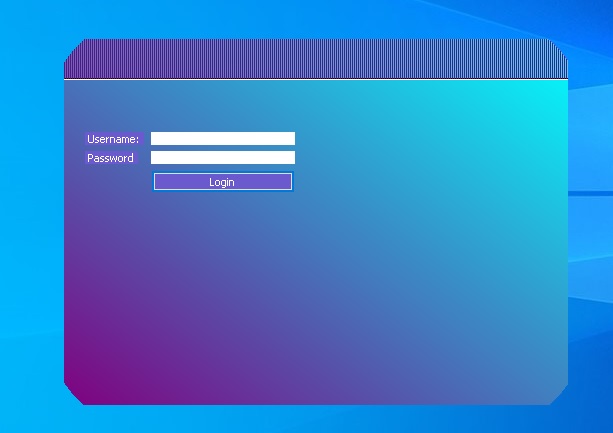
افتح مشروع جديد وضع هذا الكود
كود :
'3booody///vb4arb.com

    Private Sub Form1_Paint(ByVal sender As Object, ByVal e As System.Windows.Forms.PaintEventArgs) Handles Me.Paint

        Dim p() As Point = {New Point(20, 0), New Point(Me.Width - 20, 0), New Point(Me.Width - 20, Me.Height), New Point(20, Me.Height)}

        Dim GRP As New Drawing2D.GraphicsPath

        GRP.AddClosedCurve(p)

        e.Graphics.FillPath(mx(ClientRectangle, Color.Cyan, Color.Purple), GRP) 'ملئ الفورم بالالوان

        Me.Region = New Region(GRP)

        e.Graphics.DrawLine(New Pen(Color.White, 2), 0, 40, Me.Width, 40) '

        e.Graphics.DrawLine(New Pen(Color.Black, 1), 0, 39, Me.Width, 39)

        For i As Integer = 0 To Me.Width Step 2

            e.Graphics.DrawLine(Pens.Purple, i, 0, i, 39)

        Next

        GRP.Dispose()

    End Sub


    Private Sub Form1_Load(ByVal sender As System.Object, ByVal e As System.EventArgs) Handles MyBase.Load

        FormBorderStyle = Windows.Forms.FormBorderStyle.None 'جعل الفورم بالشكل الاعتيادي

    End Sub

    'دالة تعمل على التدرج اللوني

    Function mx(ByVal Rec As Rectangle, ByVal clr1 As Color, ByVal clr2 As Color) As Drawing2D.LinearGradientBrush

        Return New Drawing2D.LinearGradientBrush(Rec, clr1, clr2, Drawing2D.LinearGradientMode.BackwardDiagonal)

    End Function


#Region "Move" 'لتحريك الفورم من الاعلى

    Dim b As Boolean = False

    Dim x, y As Integer


    Private Sub Form1_MouseDown(ByVal sender As Object, ByVal e As System.Windows.Forms.MouseEventArgs) Handles Me.MouseDown

        If Not e.Y < 40 Then Return

        b = True

        x = e.X : y = e.Y

    End Sub

    Private Sub Form1_MouseMove(ByVal sender As Object, ByVal e As System.Windows.Forms.MouseEventArgs) Handles Me.MouseMove

        If b Then

            Me.Location = New Point(Me.Location.X + e.X - x, Me.Location.Y + e.Y - y)

        End If

    End Sub

    Private Sub Form1_MouseUp(ByVal sender As Object, ByVal e As System.Windows.Forms.MouseEventArgs) Handles Me.MouseUp

        b = False

    End Sub

#End Region
RE: التحكم بشكل ال form - أمجد وضاح - 04-11-19
لو هناك لديك اكثر من شكل
RE: التحكم بشكل ال form - 3booody - 04-11-19
طبعآ اخي فقط تعلم العمل على الفئة GraphicsPath التابعة لمجال الاسماء System.Drawing.Drawing2D.GraphicsPath
من خلالها تطبق عدة اشكال بسهولة
كود :
Private Sub Form1_Load(ByVal sender As System.Object, ByVal e As System.EventArgs) Handles MyBase.Load

        FormBorderStyle = Windows.Forms.FormBorderStyle.None

    End Sub


    Private Sub Form1_Paint(ByVal sender As Object, ByVal e As System.Windows.Forms.PaintEventArgs) Handles Me.Paint

        Dim grp As New Drawing2D.GraphicsPath

        grp.AddEllipse(ClientRectangle)

        Me.Region = New Region(grp)

        grp.Dispose()

    End Sub
RE: التحكم بشكل ال form - عبد العزيز البسكري - 04-11-19
شكرا جزيلا أخي اكريم 3booody
مثال آخر ..
كود :
   Public Sub Round_Corners_Form(obj As Form)

        obj.FormBorderStyle = FormBorderStyle.None

        obj.BackColor = Color.Cyan

        Dim DGP As New Drawing2D.GraphicsPath

        DGP.StartFigure()

        'top left corner

        DGP.AddArc(New Rectangle(0, 0, 40, 40), 180, 90)

        DGP.AddLine(40, 0, obj.Width - 40, 0)

        'top right corner

        DGP.AddArc(New Rectangle(obj.Width - 40, 0, 40, 40), -90, 90)

        DGP.AddLine(obj.Width, 40, obj.Width, obj.Height - 40)

        'buttom right corner

        DGP.AddArc(New Rectangle(obj.Width - 40, obj.Height - 40, 40, 40), 0, 90)

        DGP.AddLine(obj.Width - 40, obj.Height, 40, obj.Height)

        'buttom left corner

        DGP.AddArc(New Rectangle(0, obj.Height - 40, 40, 40), 90, 90)

        DGP.CloseFigure()

        obj.Region = New Region(DGP)

    End Sub
بالفورم لود لأي فورم ..
كود :
Call Round_Corners_Form(Me)تحياتي
RE: التحكم بشكل ال form - 3booody - 04-11-19
(04-11-19, 08:49 PM)عبد العزيز البسكري كتب :شكرا جزيلا أخي اكريم 3booodyمثال آخر ..كود :
   Public Sub Round_Corners_Form(obj As Form)

        obj.FormBorderStyle = FormBorderStyle.None

        obj.BackColor = Color.Cyan

        Dim DGP As New Drawing2D.GraphicsPath

        DGP.StartFigure()

        'top left corner

        DGP.AddArc(New Rectangle(0, 0, 40, 40), 180, 90)

        DGP.AddLine(40, 0, obj.Width - 40, 0)

        'top right corner

        DGP.AddArc(New Rectangle(obj.Width - 40, 0, 40, 40), -90, 90)

        DGP.AddLine(obj.Width, 40, obj.Width, obj.Height - 40)

        'buttom right corner

        DGP.AddArc(New Rectangle(obj.Width - 40, obj.Height - 40, 40, 40), 0, 90)

        DGP.AddLine(obj.Width - 40, obj.Height, 40, obj.Height)

        'buttom left corner

        DGP.AddArc(New Rectangle(0, obj.Height - 40, 40, 40), 90, 90)

        DGP.CloseFigure()

        obj.Region = New Region(DGP)

    End Sub
بالفورم لود لأي فورم ..كود :
Call Round_Corners_Form(Me)
تحياتي
ماشاء الله ,, جزاك الله خيرآ استاذ
RE: التحكم بشكل ال form - ابو روضة - 01-01-20
منتهى الروعى أخى العزيز ماشاء الله...
كيف أجعل الزر والتكست أو أى أداة أخرى يشبهان الفورم ؟
RE: التحكم بشكل ال form - 3booody - 01-01-20
اهلآ بك اخي الغالي
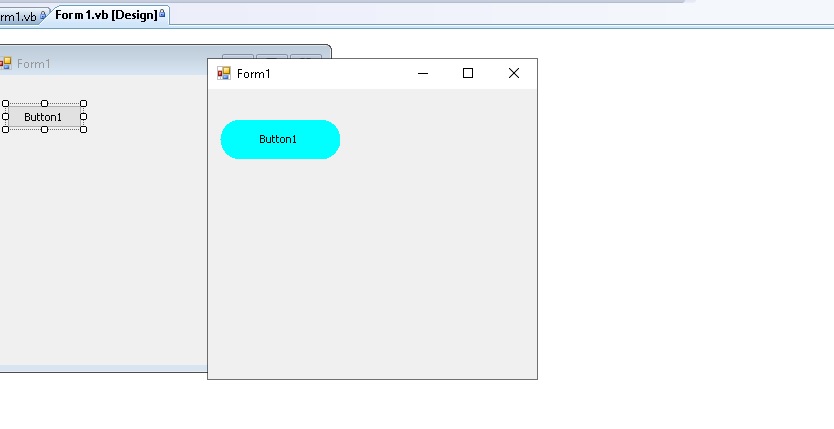
كل مافي الامر تقوم برسم الشكل الذي تريد بالفئة GraphicsPath ثم تحدد منطقة الاداة بالرسم المصمم
ضع زر بوتون وهذا الكود بحدث التحميل
كود :
Private Sub Form1_Load(ByVal sender As System.Object, ByVal e As System.EventArgs) Handles MyBase.Load

        Button1.FlatAppearance.BorderSize = 0

        Button1.FlatStyle = Windows.Forms.FlatStyle.Flat

        Button1.BackColor = Color.Cyan

        Button1.Size = New Size(120, 40)

        Dim DGP As New Drawing2D.GraphicsPath

        DGP.StartFigure()

        Dim w As Integer = Button1.Width / (Button1.Width / 40)

        DGP.AddArc(New Rectangle(0, 0, w, 40), 180, 100)

        DGP.AddArc(New Rectangle(Button1.Width - 40, 0, w, 40), -90, 100)

        DGP.AddArc(New Rectangle(Button1.Width - 40, Button1.Height - 40, w, 40), 0, 100)

        DGP.AddArc(New Rectangle(0, Button1.Height - 40, w, 40), 90, 100)

        DGP.CloseFigure()

        Button1.Region = New Region(DGP)

        DGP.Dispose()

    End Sub
لاحظ اني رسمت الشكل المطلوب ثم قمت بالامر
كود :
Button1.Region = New Region(DGP)أي تحديد شكل الزر طبقآ للرسم الموجود بالفئة DGP
RE: التحكم بشكل ال form - ابو روضة - 01-01-20
(01-01-20, 09:33 PM)3booody كتب : اهلآ بك اخي الغالي
كل مافي الامر تقوم برسم الشكل الذي تريد بالفئة GraphicsPath ثم تحدد منطقة الاداة بالرسم المصمم
ضع زر بوتون وهذا الكود بحدث التحميل
كود :
Private Sub Form1_Load(ByVal sender As System.Object, ByVal e As System.EventArgs) Handles MyBase.Load

        Button1.FlatAppearance.BorderSize = 0

        Button1.FlatStyle = Windows.Forms.FlatStyle.Flat

        Button1.BackColor = Color.Cyan

        Button1.Size = New Size(120, 40)

        Dim DGP As New Drawing2D.GraphicsPath

        DGP.StartFigure()

        Dim w As Integer = Button1.Width / (Button1.Width / 40)

        DGP.AddArc(New Rectangle(0, 0, w, 40), 180, 100)

        DGP.AddArc(New Rectangle(Button1.Width - 40, 0, w, 40), -90, 100)

        DGP.AddArc(New Rectangle(Button1.Width - 40, Button1.Height - 40, w, 40), 0, 100)

        DGP.AddArc(New Rectangle(0, Button1.Height - 40, w, 40), 90, 100)

        DGP.CloseFigure()

        Button1.Region = New Region(DGP)

        DGP.Dispose()

    End Sub
لاحظ اني رسمت الشكل المطلوب ثم قمت بالامر
كود :
Button1.Region = New Region(DGP)
أي تحديد شكل الزر طبقآ للرسم الموجود بالفئة DGP
الله يكرمك أخى العزيز ويبارك بعمرك ويزيدك من علمه.
RE: التحكم بشكل ال form - 3booody - 02-01-20
ولك بالمثل ان شاء الله استاذ ابو روضة , ربي يزيدك من علمه