
+- منتدى فيجوال بيسك لكل العرب | منتدى المبرمجين العرب (http://vb4arb.com/vb)
+-- قسم : قسم لغة الفيجوال بيسك VB.NET (http://vb4arb.com/vb/forumdisplay.php?fid=182)
+--- قسم : قسم اسئلة VB.NET (http://vb4arb.com/vb/forumdisplay.php?fid=183)
+--- الموضوع : عرض Object داخل Datagridview? (/showthread.php?tid=41833)
عرض Object داخل Datagridview? - silverlord - 03-07-22
السلام عليكم ورحمة الله وبركاته
عندي قائمة List وداخلها قاموس هل يوجد طريقة لعرضها داخل Datagridview او Listview?
هذا مثال :
كود :
Public Class Profile

    Property Name As String

    Property isWork As Boolean

    Property Informations As New Dictionary(Of String, String)


End Class
كود :
Dim ProfileList As New List(Of Profile)


        Dim p1 As New Profile

        p1.Name = "Omar"

        p1.isWork = True

        p1.Informations.Add("Address", "KSA")

        p1.Informations.Add("Age", "23")

        p1.Informations.Add("Phone", "09485433")

        Dim p2 As New Profile

        p2.Name = "Samy"

        p2.isWork = False

        p2.Informations.Add("Address", "Egypt")

        p2.Informations.Add("Age", "22")

        p2.Informations.Add("Phone", "0665573")

        Dim p3 As New Profile

        p3.Name = "Ahmad"

        p3.isWork = True

        p3.Informations.Add("Address", "Morocco")

        p3.Informations.Add("Age", "24")

        p3.Informations.Add("Phone", "6565573")

        Dim p4 As New Profile

        p4.Name = "Amar"

        p4.isWork = False

        p4.Informations.Add("Address", "Jordan")

        p4.Informations.Add("Age", "25")

        p4.Informations.Add("Phone", "6565573")

        ProfileList.Add(p1)

        ProfileList.Add(p2)

        ProfileList.Add(p3)

ProfileList.Add(p4)ويكون العرض هكذا
كود :
Name        isWork         Key             Value

Amar        False           Address      Jordan

Amar        False           Age             25

Amar        False           Phone         6565573

Ahmad      True            Address      Morocco

Ahmad      True            Age             24

Ahmad      True            Phone         6565573

etc..
RE: عرض Object داخل Datagridview? - سعود - 03-07-22
و عليكم السلام ورحمة الله وبركاته
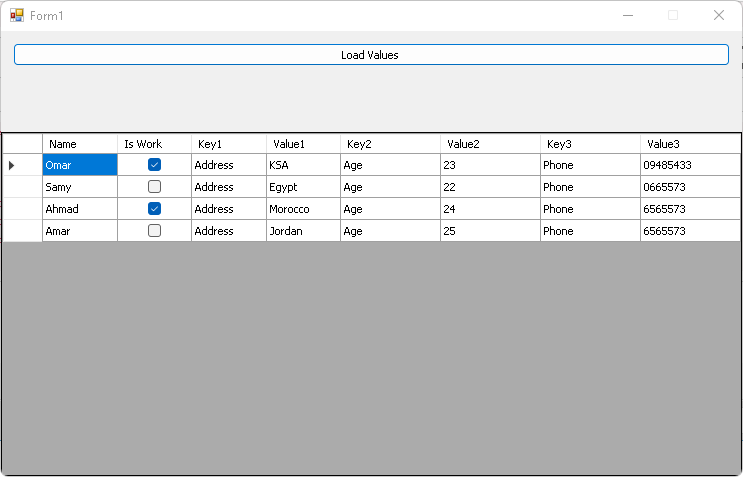
الكلاسات بعد التعديل:
PHP كود :
Public Class Class1
    Public Function GetProfile() As List(Of Profile)
        Dim ProfileList As New List(Of Profile)
        Dim p1 As New Profile
        p1.Name = "Omar"
        p1.isWork = True
        p1.Informations.Add("Address", "KSA")
        p1.Informations.Add("Age", "23")
        p1.Informations.Add("Phone", "09485433")
        Dim p2 As New Profile
        p2.Name = "Samy"
        p2.isWork = False
        p2.Informations.Add("Address", "Egypt")
        p2.Informations.Add("Age", "22")
        p2.Informations.Add("Phone", "0665573")
        Dim p3 As New Profile
        p3.Name = "Ahmad"
        p3.isWork = True
        p3.Informations.Add("Address", "Morocco")
        p3.Informations.Add("Age", "24")
        p3.Informations.Add("Phone", "6565573")
        Dim p4 As New Profile
        p4.Name = "Amar"
        p4.isWork = False
        p4.Informations.Add("Address", "Jordan")
        p4.Informations.Add("Age", "25")
        p4.Informations.Add("Phone", "6565573")
        ProfileList.Add(p1)
        ProfileList.Add(p2)
        ProfileList.Add(p3)
        ProfileList.Add(p4)
        Return ProfileList
    End Function
End Class
Public Class Profile
    Property Name As String
    Property isWork As Boolean
    Property Informations As New Dictionary(Of String, String)
End Class
والتالي اجراء من زر في فورم
PHP كود :
       d.Rows.Clear()
        Dim c As New Class1
        For Each pro As Profile In c.GetProfile
            d.Rows.Add(pro.Name, pro.isWork, pro.Informations.Keys(0), pro.Informations.Values(0), pro.Informations.Keys(1), pro.Informations.Values(1), pro.Informations.Keys(2), pro.Informations.Values(2))
        Next
تعديل على الفورم فقط
PHP كود :
Public Class Form1
    Private Sub createcolls()
        d.ColumnCount = 5
        d.Columns(0).HeaderText = "Name"
        d.Columns(1).HeaderText = "Is Work"
        d.Columns(2).HeaderText = "Address"
        d.Columns(3).HeaderText = "Age"
        d.Columns(4).HeaderText = "Phone"
        d.AutoSizeColumnsMode = DataGridViewAutoSizeColumnsMode.Fill
    End Sub

    Private Sub Button1_Click(sender As Object, e As EventArgs) Handles Button1.Click
        d.Rows.Clear()
        Dim c As New Class1
        For Each pro As Profile In c.GetProfile
            d.Rows.Add(pro.Name, pro.isWork, pro.Informations.Values(0), pro.Informations.Values(1), pro.Informations.Values(2))
        Next
    End Sub

    Private Sub Form1_Load(sender As Object, e As EventArgs) Handles MyBase.Load
        createcolls()
    End Sub
End Class
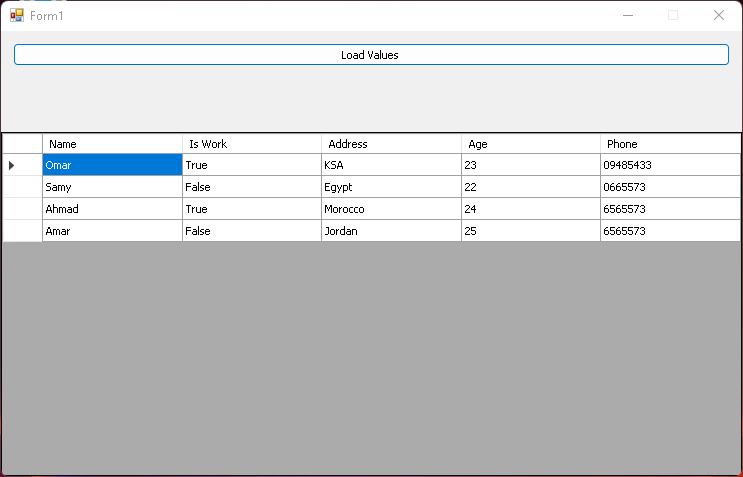
المثال البسيط مرفق
RE: عرض Object داخل Datagridview? - silverlord - 04-07-22
(03-07-22, 11:09 PM)سعود كتب : و عليكم السلام ورحمة الله وبركاتهشكرا لك اخي سعود
الكلاسات بعد التعديل:
PHP كود :
Public Class Class1
    Public Function GetProfile() As List(Of Profile)
        Dim ProfileList As New List(Of Profile)
        Dim p1 As New Profile
        p1.Name = "Omar"
        p1.isWork = True
        p1.Informations.Add("Address", "KSA")
        p1.Informations.Add("Age", "23")
        p1.Informations.Add("Phone", "09485433")
        Dim p2 As New Profile
        p2.Name = "Samy"
        p2.isWork = False
        p2.Informations.Add("Address", "Egypt")
        p2.Informations.Add("Age", "22")
        p2.Informations.Add("Phone", "0665573")
        Dim p3 As New Profile
        p3.Name = "Ahmad"
        p3.isWork = True
        p3.Informations.Add("Address", "Morocco")
        p3.Informations.Add("Age", "24")
        p3.Informations.Add("Phone", "6565573")
        Dim p4 As New Profile
        p4.Name = "Amar"
        p4.isWork = False
        p4.Informations.Add("Address", "Jordan")
        p4.Informations.Add("Age", "25")
        p4.Informations.Add("Phone", "6565573")
        ProfileList.Add(p1)
        ProfileList.Add(p2)
        ProfileList.Add(p3)
        ProfileList.Add(p4)
        Return ProfileList
    End Function
End Class
Public Class Profile
    Property Name As String
    Property isWork As Boolean
    Property Informations As New Dictionary(Of String, String)
End Class
والتالي اجراء من زر في فورم
PHP كود :
       d.Rows.Clear()
        Dim c As New Class1
        For Each pro As Profile In c.GetProfile
            d.Rows.Add(pro.Name, pro.isWork, pro.Informations.Keys(0), pro.Informations.Values(0), pro.Informations.Keys(1), pro.Informations.Values(1), pro.Informations.Keys(2), pro.Informations.Values(2))
        Next
تعديل على الفورم فقط
PHP كود :
Public Class Form1
    Private Sub createcolls()
        d.ColumnCount = 5
        d.Columns(0).HeaderText = "Name"
        d.Columns(1).HeaderText = "Is Work"
        d.Columns(2).HeaderText = "Address"
        d.Columns(3).HeaderText = "Age"
        d.Columns(4).HeaderText = "Phone"
        d.AutoSizeColumnsMode = DataGridViewAutoSizeColumnsMode.Fill
    End Sub

    Private Sub Button1_Click(sender As Object, e As EventArgs) Handles Button1.Click
        d.Rows.Clear()
        Dim c As New Class1
        For Each pro As Profile In c.GetProfile
            d.Rows.Add(pro.Name, pro.isWork, pro.Informations.Values(0), pro.Informations.Values(1), pro.Informations.Values(2))
        Next
    End Sub

    Private Sub Form1_Load(sender As Object, e As EventArgs) Handles MyBase.Load
        createcolls()
    End Sub
End Class
المثال البسيط مرفق