+- منتدى فيجوال بيسك لكل العرب | منتدى المبرمجين العرب (http://vb4arb.com/vb)
+-- قسم : قسم قواعد البيانات (http://vb4arb.com/vb/forumdisplay.php?fid=40)
+--- قسم : قسم أمثلة ومشاريع قواعد البيانات تحت بيئة الـ.NET (http://vb4arb.com/vb/forumdisplay.php?fid=77)
+--- الموضوع : [مشروع] ادارة بسيطة لملف الاكسس (/showthread.php?tid=45926)
ادارة بسيطة لملف الاكسس - سعود - 20-04-23
السلام عليكم ورحمةالله وبركاته
آمل ان يفيد هذا المثال احد كفكرة او تطبيق وهذا نسخة محدثة لفكرة اقل منها عملتها سابقا
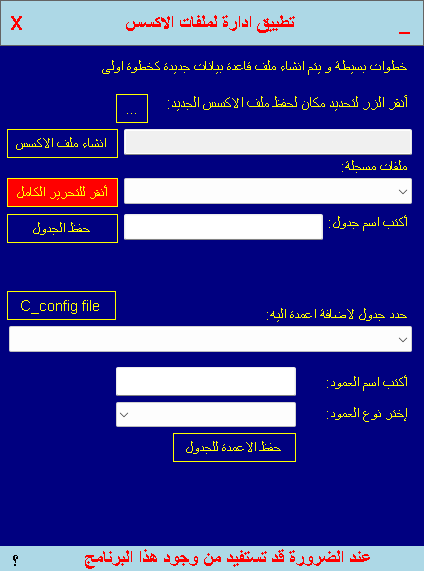
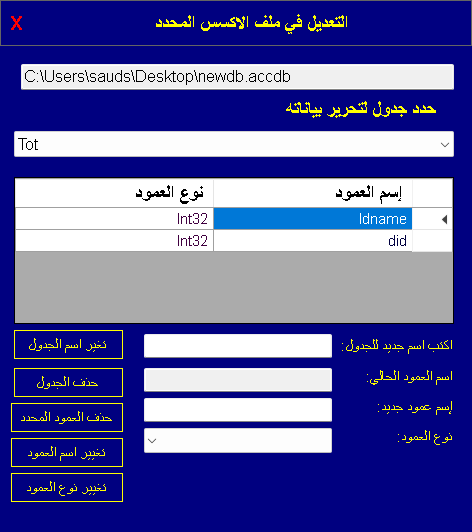
المشروع افضل بكثير اضافة ملف قاعدة اكسس جديدة و عدة جداول واعمدة في الاطار الاول الرئيسي
اما الاطار الاخر فهو للتعديلات كما يظهر الصورتين اعلى هذا الكلام
password:-sarab
هذا الموديول به كافة العمليات لمن يحب الاكتفاء بها
PHP كود :
Imports System.Data.Common
Imports System.Data.OleDb
Imports System.Runtime.InteropServices
Imports System.Xml
Module Module1
    Public config As String = IO.Path.GetDirectoryName(Application.ExecutablePath) & "\config.txt"
    Public Sub rep(ByRef frm As Form)
        If frm.Left < 0 Or frm.Right > Screen.PrimaryScreen.Bounds.Right Then frm.Left = 0
        If frm.Top < 0 Or frm.Bottom > Screen.PrimaryScreen.Bounds.Bottom Then frm.Top = 0
    End Sub
    Public Function constr(st As String, Optional ByVal password As String = "vb4arb") As String
        Return "provider=microsoft.ace.oledb.12.0;data source=" & st & ";jet oledb:database password=" & password & ""
    End Function
    Public Function createdb(dbpath As String) As Boolean
        Try
            Dim objConnection = CreateObject("ADOX.Catalog")
            Dim str As String = constr(dbpath)
            objConnection.Create(str)
            Return True
        Catch ex As Exception
            Return False
        End Try
    End Function
    Public Function GetTables(dbpath As String) As DataSet
        Dim str As String = constr(dbpath)
        Dim ds As New DataSet
        Dim dt As DataTable
        Using conn As New OleDbConnection(str)
            If conn.State = ConnectionState.Closed Then conn.Open()
            dt = conn.GetSchema("TABLES", {Nothing, Nothing, Nothing, "TABLE"})
            For Each dr As DataRow In dt.Rows
                ds.Tables.Add(dr("TABLE_NAME"))
            Next
            If conn.State = ConnectionState.Open Then conn.Close()
        End Using
        Return ds
    End Function
    Public Sub createcolls(dbpath As String, tbname As String, colname As String, coltype As String)
        Using con As New OleDb.OleDbConnection(constr(dbpath))
            Using cm As New OleDb.OleDbCommand("", con)
                Dim cn As String = ""
                Dim ct As String
                cn = colname
                ct = coltype
                cm.CommandText = "ALTER TABLE " & tbname & " ADD " & cn & " " & ct
                If con.State = ConnectionState.Closed Then con.Open()
                Try
                    cm.ExecuteNonQuery()
                    MsgBox("تم اضافة عمود: " & colname & " الى جدول: " & tbname & " بنجاح ", MsgBoxStyle.Information, "save colls")
                Catch ex As Exception
                    MsgBox(Err.Description, MsgBoxStyle.Critical, "error")
                Finally
                    If con.State = ConnectionState.Open Then con.Close()
                End Try
                If con.State = ConnectionState.Open Then con.Close()
            End Using
        End Using
    End Sub
    Public Function isdbfount(adbpath As String) As Boolean
        Return IO.File.ReadAllLines(config).Contains(adbpath)
    End Function
    Public Function isdbfountreal(dbpath As String) As Boolean
        Return IO.File.Exists(dbpath)
    End Function
    Public Function alldbs() As String()
        Return IO.File.ReadAllLines(config)
    End Function
    Function isendwithnewline() As String
        Dim rcount As Integer = IO.File.ReadAllLines(config).Count
        Dim t As String = IO.File.ReadLines(config)(rcount)
        Return t
    End Function
    Public Sub create_Table(dbpath As String, tbname As String)
        Using con As New OleDb.OleDbConnection(constr(dbpath))
            Using cm As New OleDb.OleDbCommand("", con)
                cm.CommandText = "create table " & tbname
                If con.State = ConnectionState.Closed Then con.Open()
                Try
                    cm.ExecuteNonQuery()
                    MsgBox("تم حفظ الجدول", MsgBoxStyle.Information, "حفظ جدول")
                    If con.State = ConnectionState.Open Then con.Close()
                Catch ex As Exception
                    MsgBox(Err.Description, MsgBoxStyle.Critical, "error")
                    If con.State = ConnectionState.Open Then con.Close()
                Finally
                    If con.State = ConnectionState.Open Then con.Close()
                End Try
            End Using
        End Using
    End Sub
    Public Sub renametable(dbpath As String, oldtb As String, newtb As String)
        Try
            Dim con As New ADODB.Connection
            con.ConnectionString = constr(dbpath)
            con.Open()
            Dim ax As New ADOX.Catalog
            ax.ActiveConnection = con
            ax.Tables(oldtb).Name = newtb
            con.Close()
            MsgBox("تم تعديل الاسم بنجاح " & oldtb & " الى " & newtb)
        Catch ex As Exception
            MsgBox(Err.Description, MsgBoxStyle.Critical, "error")
        End Try
    End Sub
    Public Sub dropColumn(dbpath As String, tbname As String, ColName As String)
        Using con As New OleDb.OleDbConnection(constr(dbpath))
            Using cm As New OleDb.OleDbCommand("", con)
                cm.CommandText = "alter table " & tbname & " drop Column " & ColName
                Try
                    If con.State = ConnectionState.Closed Then con.Open()
                    cm.ExecuteNonQuery()
                    MsgBox("تم حذف العمود بنجاح", MsgBoxStyle.Information, "حذف")
                    If con.State = ConnectionState.Open Then con.Close()
                Catch ex As Exception
                    MsgBox(Err.Description, MsgBoxStyle.Critical, "error")
                    If con.State = ConnectionState.Open Then con.Close()
                Finally
                    If con.State = ConnectionState.Open Then con.Close()
                End Try
            End Using
        End Using
    End Sub
    Public Sub droptable(dbpath As String, tbname As String)
        Using con As New OleDb.OleDbConnection(constr(dbpath))
            Using cm As New OleDb.OleDbCommand("", con)
                cm.CommandText = "drop table " & tbname & ""
                Try
                    If con.State = ConnectionState.Closed Then con.Open()
                    cm.ExecuteNonQuery()
                    MsgBox("تم حذف الجدول بنجاح", MsgBoxStyle.Information, "حذف")
                    If con.State = ConnectionState.Open Then con.Close()
                Catch ex As Exception
                    MsgBox(Err.Description, MsgBoxStyle.Critical, "error")
                    If con.State = ConnectionState.Open Then con.Close()
                Finally
                    If con.State = ConnectionState.Open Then con.Close()
                End Try
            End Using
        End Using
    End Sub
    Public Sub change_column_name(dbpath As String, tbname As String, ColName As String, newcolname As String)
        Try
            Dim con As New ADODB.Connection
            con.ConnectionString = constr(dbpath)
            con.Open()
            Dim ax As New ADOX.Catalog
            ax.ActiveConnection = con
            ax.Tables(tbname).Columns(ColName).Name = newcolname
            con.Close()
            MsgBox("تم تعديل الاسم بنجاح " & ColName & " الى " & newcolname)
        Catch ex As Exception
            MsgBox(Err.Description, MsgBoxStyle.Critical, "error")
        End Try
    End Sub
    Public Sub retypecolumn(dbpath As String, tbname As String, ColName As String, coltype As String)
        Using con As New OleDb.OleDbConnection(constr(dbpath))
            Using cm As New OleDb.OleDbCommand("", con)
                Dim cn As String = ""
                Dim ct As String
                cn = ColName
                ct = coltype
                cm.CommandText = "ALTER TABLE " & tbname & " ALTER COLUMN " & cn & " " & coltype & ""
                If con.State = ConnectionState.Closed Then con.Open()
                Try
                    cm.ExecuteNonQuery()
                    MsgBox("تم تغيير نوع عمود: " & ColName & " الى نوع: " & coltype & " بنجاح ", MsgBoxStyle.Information, "save colls")
                Catch ex As Exception
                    MsgBox(Err.Description, MsgBoxStyle.Critical, "error")
                Finally
                    If con.State = ConnectionState.Open Then con.Close()
                End Try
                If con.State = ConnectionState.Open Then con.Close()
            End Using
        End Using
    End Sub
    Public Function getColls(dbpath As String, tbname As String) As DataTable
        Using con As New OleDb.OleDbConnection(constr(dbpath))
            Dim dt As New DataTable
            Using cm As New OleDb.OleDbCommand("select * from " & tbname & "", con)
                If con.State = ConnectionState.Closed Then con.Open()
                Try
                    dt.Load(cm.ExecuteReader)
                Catch ex As Exception
                    MsgBox(Err.Description, MsgBoxStyle.Critical, "error")
                    If con.State = ConnectionState.Open Then con.Close()
                Finally
                    If con.State = ConnectionState.Open Then con.Close()
                End Try
                If con.State = ConnectionState.Open Then con.Close()
            End Using
            Return dt
        End Using
    End Function
End Module
اول مرة استفيد من هذه الفكرة اذ انه الان ليس لدي اي اوفيس مثبت فيه الاكسس المتوفر عندي يخلو من الاكسس فقلت لن اتخلى عن الاصدار الحديث اللذي امتلكه(اشتريته ظنا مني انه يحتوي الاكسس و ان الفرق فقط الدفع باشتراك او الدفع مرة واحدة) لانه باصدار 64 بت والقديم لدي 2007 32 بت والنظام 64 بت وفيجوال استوديو 64 بت فليس امامي الا هذه الفكرة فاحببت ان تفيد احد كفكرة او تطبيق.
اسال الله ان يغفر لي ولكم
و كل عام وانتم بخير
هذه عيدية لكل الاعضاء
تنبيه!
عن طريق الخطأ اضفت كلمة المرور لاجراء اسناد مسار ملف القاعدة constr فقم بازالتها واجعلها فارغة ان شئت لانها ستحول ملف الاكسس المفتوح الى مغلق بكلمة مرور vb4arbتنبيه!
RE: ادارة بسيطة لملف الاكسس - سعود - 20-04-23
ضمن حدث MyApplication_Startup في ملف ApplicationEvents.vb يوجد هذا الكود:
PHP كود :
If IO.File.Exists(config) = False Then
IO.File.CreateText(config).Close()
End If
هذا لمن اقتصر على الموديول لانه[الضمير يعود على الكود المسؤول عن انشاء الملف config.txt] ينشيء الملف بالكود الخاص بحفظ مايتم انشاؤه من ملفات.
كل عام و انتم بخير
RE: ادارة بسيطة لملف الاكسس - سعود - 21-04-23
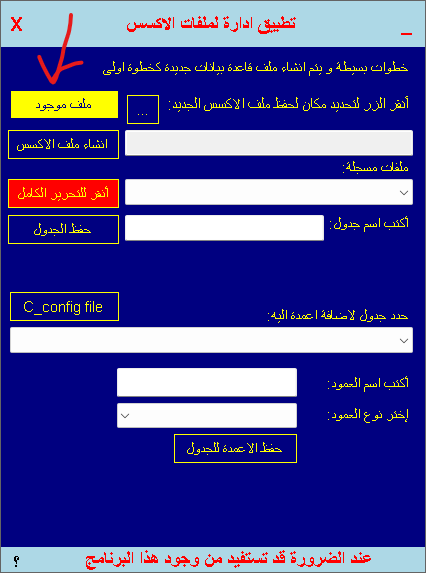
سبحان الله!
لم انتبه لهذا القصور المعيب
ماهي الفائدة اذا لم يتمكن مستخدم البرنامج من ادارة اي ملف اكسس غير ما تم انشاؤه به؟!
تم التعديل
كل عام و انتم بخير.
معذرة باقي كم تعديل ضروري!
RE: ادارة بسيطة لملف الاكسس - سعود - 21-04-23
الان المشروع يحتوي واجهة الضغط والتحكم بكلمة المرور من حيث اضافتها او ازالتها