
+- منتدى فيجوال بيسك لكل العرب | منتدى المبرمجين العرب (http://vb4arb.com/vb)
+-- قسم : قسم لغة الفيجوال بيسك VB.NET (http://vb4arb.com/vb/forumdisplay.php?fid=182)
+--- قسم : قسم اسئلة VB.NET (http://vb4arb.com/vb/forumdisplay.php?fid=183)
+--- الموضوع : [VB.NET] اين الخطأ هنا .. (/showthread.php?tid=50931)
اين الخطأ هنا .. - h2551996 - 12-01-25
السلام عليكم
ما الحل يا اخوان
https://top4top.io/downloadf-3299ste8m1-rar.html
كود :
Public Sub MoveToDOne()


        con = New SqlConnection(cs)

        Dim CmdInsert As New SqlCommand

        Dim RowsAffected As Integer = 0

        If con.State = 1 Then con.Close()

        con.Open()


        '################################################################

        For i As Integer = 0 To DataGridView2.Rows.Count - 1

            cmd = New SqlCommand

            With cmd

                .Connection = con

                .CommandType = CommandType.Text

                .CommandText = "Insert Into DeviceDone(device_code,cus_name,device_name,cus_phone,cus_address,Brand,model,Place_reform,serial_device,problem,Customer_Complaint,Maximum_cost,received_date,delivery_date)values(@device_code,@cus_name,@device_name,@cus_phone,@cus_address,@Brand,@model,@Place_reform,@serial_device,@problem,@Customer_Complaint,@Maximum_cost,@received_date,@delivery_date)"

                .Parameters.Clear()

                .Parameters.AddWithValue("@device_code", SqlDbType.Int).Value = DataGridView2.Rows(i).Cells(0).Value

                .Parameters.AddWithValue("@cus_name", SqlDbType.VarChar).Value = DataGridView2.Rows(i).Cells(1).Value

                .Parameters.AddWithValue("@device_name", SqlDbType.VarChar).Value = 0

                .Parameters.AddWithValue("@cus_phone", SqlDbType.VarChar).Value = DataGridView2.Rows(i).Cells(2).Value

                .Parameters.AddWithValue("@cus_address", SqlDbType.VarChar).Value = 0

                .Parameters.AddWithValue("@Brand", SqlDbType.VarChar).Value = 0

                .Parameters.AddWithValue("@model", SqlDbType.VarChar).Value = 0

                .Parameters.AddWithValue("@Place_reform", SqlDbType.VarChar).Value = 0

                .Parameters.AddWithValue("@serial_device", SqlDbType.VarChar).Value = 0

                .Parameters.AddWithValue("@problem", SqlDbType.VarChar).Value = DataGridView2.Rows(i).Cells(3).Value

                .Parameters.AddWithValue("@Customer_Complaint", SqlDbType.VarChar).Value = 0

                .Parameters.AddWithValue("@Maximum_cost", SqlDbType.VarChar).Value = DataGridView2.Rows(i).Cells(4).Value

                .Parameters.AddWithValue("@received_date", SqlDbType.Date).Value = DataGridView2.Rows(i).Cells(5).Value

                .Parameters.AddWithValue("@delivery_date", SqlDbType.Date).Value = DataGridView2.Rows(i).Cells(6).Value

                '.Parameters.AddWithValue("@device_code", SqlDbType.Int).Value = DataGridView2.Rows(i).Cells(0).Value

                '.Parameters.AddWithValue("@cus_name", SqlDbType.VarChar).Value = DataGridView2.Rows(i).Cells(1).Value

                '.Parameters.AddWithValue("@cus_phone", SqlDbType.VarChar).Value = DataGridView2.Rows(i).Cells(2).Value

                '.Parameters.AddWithValue("@problem", SqlDbType.VarChar).Value = DataGridView2.Rows(i).Cells(3).Value

                '.Parameters.AddWithValue("@Maximum_cost", SqlDbType.Date).Value = DataGridView2.Rows(i).Cells(4).Value

                '.Parameters.AddWithValue("@received_date", SqlDbType.Date).Value = DataGridView2.Rows(i).Cells(5).Value

                '.Parameters.AddWithValue("@delivery_date", SqlDbType.Date).Value = DataGridView2.Rows(i).Cells(6).Value

            End With

        Next

        MsgBox(" عفواً ، هناك خطأ بعملية الحفظ", MessageBoxIcon.Exclamation)


        'MessageBox.Show(" عفواً ، هناك خطأ بعملية الحفظ", "تنبيه", MessageBoxButtons.OK, MessageBoxIcon.Error, MessageBoxDefaultButton.Button1, MessageBoxOptions.RightAlign)

        Exit Sub

        '################################################################

        con.Close()

    End Sub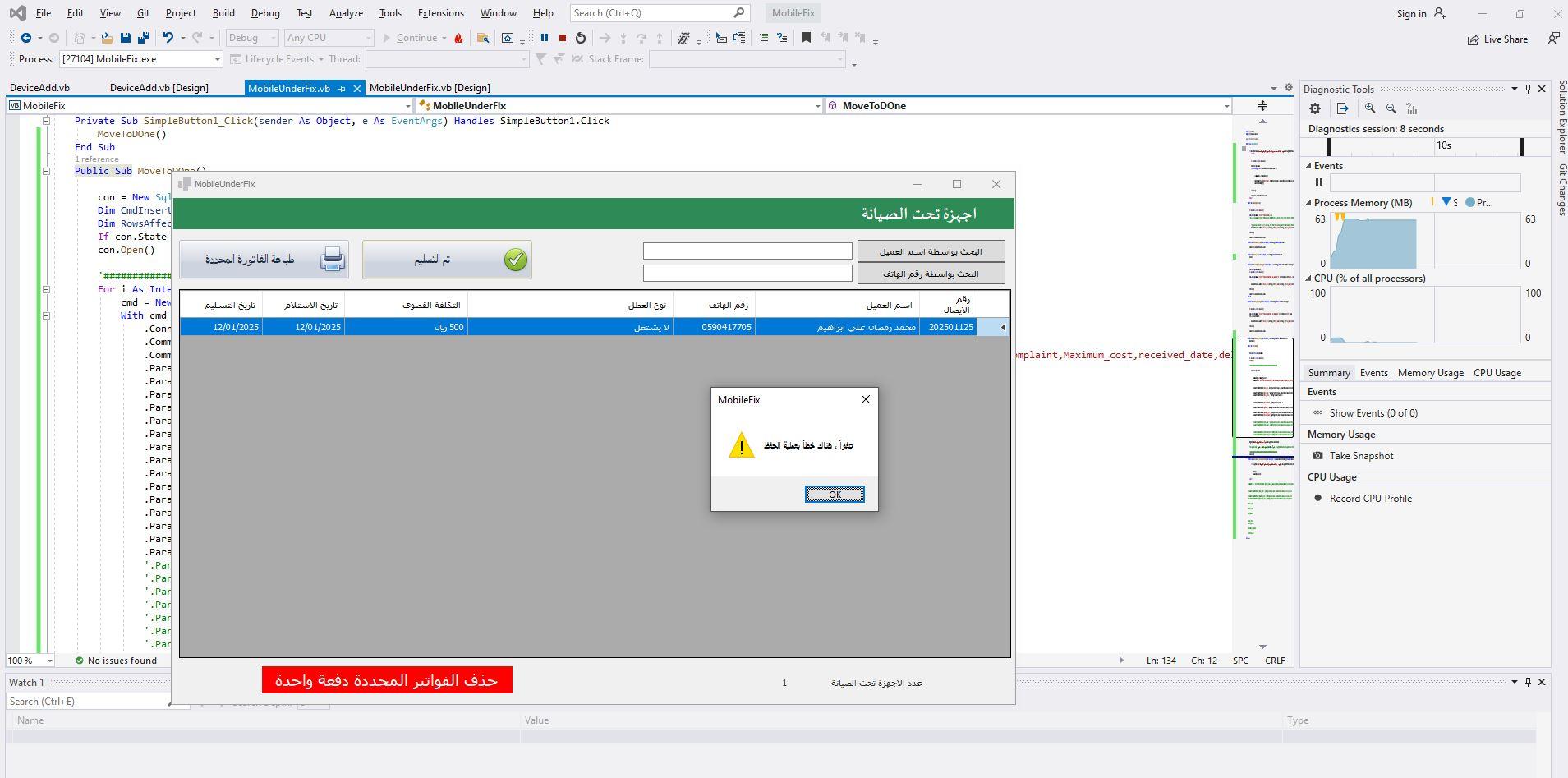
RE: اين الخطأ هنا .. - h2551996 - 13-01-25
Public Sub MoveToDOne()
con = New SqlConnection(cs)
Dim CmdInsert As New SqlCommand
Dim RowsAffected As Integer = 0
If con.State = 1 Then con.Close()
con.Open()
'################################################################
For i As Integer = 0 To DataGridView2.Rows.Count - 1
cmd = New SqlCommand
With cmd
.Connection = con
.CommandType = CommandType.Text
.CommandText = "Insert Into DeviceDone(device_code,cus_name,device_name,cus_phone,cus_address,Brand,model,Place_reform,serial_device,problem,Customer_Complaint,Maximum_cost,received_date,delivery_date)values(@device_code,@cus_name,@device_name,@cus_phone,@cus_address,@Brand,@model,@Place_reform,@serial_device,@problem,@Customer_Complaint,@Maximum_cost,@received_date,@delivery_date)"
.Parameters.Clear()
.Parameters.AddWithValue("@device_code", SqlDbType.Int).Value = DataGridView2.Rows(i).Cells(0).Value
.Parameters.AddWithValue("@cus_name", SqlDbType.VarChar).Value = DataGridView2.Rows(i).Cells(1).Value
.Parameters.AddWithValue("@device_name", SqlDbType.VarChar).Value = 0
.Parameters.AddWithValue("@cus_phone", SqlDbType.VarChar).Value = DataGridView2.Rows(i).Cells(2).Value
.Parameters.AddWithValue("@cus_address", SqlDbType.VarChar).Value = 0
.Parameters.AddWithValue("@Brand", SqlDbType.VarChar).Value = 0
.Parameters.AddWithValue("@model", SqlDbType.VarChar).Value = 0
.Parameters.AddWithValue("@Place_reform", SqlDbType.VarChar).Value = 0
.Parameters.AddWithValue("@serial_device", SqlDbType.VarChar).Value = 0
.Parameters.AddWithValue("@problem", SqlDbType.VarChar).Value = DataGridView2.Rows(i).Cells(3).Value
.Parameters.AddWithValue("@Customer_Complaint", SqlDbType.VarChar).Value = 0
.Parameters.AddWithValue("@Maximum_cost", SqlDbType.VarChar).Value = DataGridView2.Rows(i).Cells(4).Value
.Parameters.AddWithValue("@received_date", SqlDbType.Date).Value = DataGridView2.Rows(i).Cells(5).Value
.Parameters.AddWithValue("@delivery_date", SqlDbType.Date).Value = DataGridView2.Rows(i).Cells(6).Value
'.Parameters.AddWithValue("@device_code", SqlDbType.Int).Value = DataGridView2.Rows(i).Cells(0).Value
'.Parameters.AddWithValue("@cus_name", SqlDbType.VarChar).Value = DataGridView2.Rows(i).Cells(1).Value
'.Parameters.AddWithValue("@cus_phone", SqlDbType.VarChar).Value = DataGridView2.Rows(i).Cells(2).Value
'.Parameters.AddWithValue("@problem", SqlDbType.VarChar).Value = DataGridView2.Rows(i).Cells(3).Value
'.Parameters.AddWithValue("@Maximum_cost", SqlDbType.Date).Value = DataGridView2.Rows(i).Cells(4).Value
'.Parameters.AddWithValue("@received_date", SqlDbType.Date).Value = DataGridView2.Rows(i).Cells(5).Value
'.Parameters.AddWithValue("@delivery_date", SqlDbType.Date).Value = DataGridView2.Rows(i).Cells(6).Value
End With
Next
MsgBox(" عفواً ، هناك خطأ بعملية الحفظ", MessageBoxIcon.Exclamation)
'MessageBox.Show(" عفواً ، هناك خطأ بعملية الحفظ", "تنبيه", MessageBoxButtons.OK, MessageBoxIcon.Error, MessageBoxDefaultButton.Button1, MessageBoxOptions.RightAlign)
Exit Sub
'################################################################
con.Close()
End Sub
RE: اين الخطأ هنا .. - عبد العزيز البسكري - 13-01-25
ممكن لا أعرف محتوى مشروعك
لكني لا أرى بالكود أمر الحفظ
كود :
           .Parameters.AddWithValue("@received_date", SqlDbType.Date).Value = CDate(DataGridView2.Rows(i).Cells(5).Value)

                .Parameters.AddWithValue("@delivery_date", SqlDbType.Date).Value = CDate(DataGridView2.Rows(i).Cells(6).Value)


            End With

        Next


        If Con.State = 1 Then Con.Close()

        Con.Open()

        Cmd.ExecuteNonQuery()

        Con.Close()

        MsgBox("تم إضافة السجل بنجاح", MsgBoxStyle.Information, "حفظ")


        Cmd = Nothing
RE: اين الخطأ هنا .. - h2551996 - 14-01-25
الجنون ان الكود يعمل بشكل جيد
ولكن عند التجربة اكثر من مرة
تظهر رسالة الخطأ
ولكن يتم تنفيذ المطلوب
RE: اين الخطأ هنا .. - aljzazy - 14-01-25
ملاحظة صغيرة وتتكرر في الكود الخاص بك بكثير متغيرات
كود :
.Parameters.AddWithValue("@Place_reform", SqlDbType.VarChar).Value = 0كود :
"0"ملاحظة اخرى
تهيئة
كود :
SqlCommand- يتم تهيئة
cmd - داخل الحلقة ولكنه لا يتم تنفيذه بواسطة استدعاء
cmd.ExecuteNonQuery
RE: اين الخطأ هنا .. - h2551996 - 16-01-25
مشكور جزاكم الله خير اخوتي
تم حل المشكلة وهي خطأ مني
انا قمت بتحديد رسالة خطأ
تشتت الافكار
الكود يعمل بشكل جيد
وهذا هو للحاجة
كود :
Public Sub MoveToDOne()

        Try

            con = New SqlConnection(cs)

            Dim CmdInsert As New SqlCommand

            Dim RowsAffected As Integer = 0

            If con.State = 1 Then con.Close()

            con.Open()


            '################################################################

            For i As Integer = 0 To DataGridView2.Rows.Count - 1

                cmd = New SqlCommand

                With cmd

                    .Connection = con

                    .CommandType = CommandType.Text

                    .CommandText = "Insert Into DeviceDone(device_code,cus_name,device_name,cus_phone,cus_address,Brand,model,Place_reform,serial_device,problem,Customer_Complaint,Maximum_cost,received_date,delivery_date)values(@device_code,@cus_name,@device_name,@cus_phone,@cus_address,@Brand,@model,@Place_reform,@serial_device,@problem,@Customer_Complaint,@Maximum_cost,@received_date,@delivery_date)"

                    .Parameters.Clear()

                    .Parameters.AddWithValue("@device_code", SqlDbType.Int).Value = Get_Order_No()

                    .Parameters.AddWithValue("@cus_name", SqlDbType.VarChar).Value = DataGridView2.SelectedRows(i).Cells(1).Value

                    .Parameters.AddWithValue("@device_name", SqlDbType.VarChar).Value = DataGridView2.SelectedRows(i).Cells(3).Value

                    .Parameters.AddWithValue("@cus_phone", SqlDbType.VarChar).Value = DataGridView2.SelectedRows(i).Cells(2).Value

                    .Parameters.AddWithValue("@cus_address", SqlDbType.VarChar).Value = "0"

                    .Parameters.AddWithValue("@Brand", SqlDbType.VarChar).Value = "0"

                    .Parameters.AddWithValue("@model", SqlDbType.VarChar).Value = "0"

                    .Parameters.AddWithValue("@Place_reform", SqlDbType.VarChar).Value = "0"

                    .Parameters.AddWithValue("@serial_device", SqlDbType.VarChar).Value = "0"

                    .Parameters.AddWithValue("@problem", SqlDbType.VarChar).Value = DataGridView2.SelectedRows(i).Cells(4).Value

                    .Parameters.AddWithValue("@Customer_Complaint", SqlDbType.VarChar).Value = "0"

                    .Parameters.AddWithValue("@Maximum_cost", SqlDbType.VarChar).Value = DataGridView2.SelectedRows(i).Cells(5).Value

                    .Parameters.AddWithValue("@received_date", SqlDbType.Date).Value = DataGridView2.SelectedRows(i).Cells(6).Value

                    .Parameters.AddWithValue("@delivery_date", SqlDbType.Date).Value = DataGridView2.SelectedRows(i).Cells(7).Value

                    '.Parameters.AddWithValue("@device_code", SqlDbType.Int).Value = DataGridView2.Rows(i).Cells(0).Value

                    '.Parameters.AddWithValue("@cus_name", SqlDbType.VarChar).Value = DataGridView2.Rows(i).Cells(1).Value

                    '.Parameters.AddWithValue("@cus_phone", SqlDbType.VarChar).Value = DataGridView2.Rows(i).Cells(2).Value

                    '.Parameters.AddWithValue("@problem", SqlDbType.VarChar).Value = DataGridView2.Rows(i).Cells(3).Value

                    '.Parameters.AddWithValue("@Maximum_cost", SqlDbType.Date).Value = DataGridView2.Rows(i).Cells(4).Value

                    '.Parameters.AddWithValue("@received_date", SqlDbType.Date).Value = DataGridView2.Rows(i).Cells(5).Value

                    '.Parameters.AddWithValue("@delivery_date", SqlDbType.Date).Value = DataGridView2.Rows(i).Cells(6).Value

                    con.Open()

                    .ExecuteNonQuery()

                End With

            Next

            '################################################################

            con.Close()

        Catch ex As Exception

            MsgBox(" تمت عملية الحفظ بنجاح", MessageBoxIcon.Information)

            'MessageBox.Show(" عفواً ، هناك خطأ بعملية الحفظ", "تنبيه", MessageBoxButtons.OK, MessageBoxIcon.Error, MessageBoxDefaultButton.Button1, MessageBoxOptions.RightAlign)

            'Exit Sub

        End Try

        delete()

    End Sub
كود :
Private Sub delete()

        If MessageBox.Show("هل أنت متأكد تم استلام الجهاز من قبل العميل؟", "تنبيه", MessageBoxButtons.YesNo, MessageBoxIcon.Question, MessageBoxDefaultButton.Button2) = Windows.Forms.DialogResult.No Then

            Exit Sub

        Else

            con = New SqlConnection(cs)

            If con.State = 1 Then con.Close()

            con.Open()

            cmd = New SqlCommand

            For i As Integer = 0 To DataGridView2.SelectedRows.Count - 1


                With cmd

                    .CommandType = CommandType.Text

                    Dim comd As New SqlCommand("Delete from DeviceAdd Where device_code=@device_code", con)

                    comd.Parameters.Add("@device_code", SqlDbType.Int).Value = DataGridView2.SelectedRows(i).Cells(0).Value

                    comd.ExecuteNonQuery()

                End With

            Next

            con.Close()

            LoadAllQuick_Sale()

            Count.Text = DataGridView2.Rows.Count

        End If

    End Sub
RE: اين الخطأ هنا .. - h2551996 - 18-01-25
لكنه يعمل بشكل جيد ؟