


21-01-23, 02:43 PM
السلام عليكم
لدي برنامج مبيعات
وبرفق كود اضافة المنتج
اسم المنتج ( عصير )
احتاج اني ازود خانة ثانية باسم ( وحدة النصف )
وحدة المنتج ( وليكن كتبت داخلة اسم - صغير )
ياخذ من اسم المنتج كلمة ( عصير ) ومن وحدة المنتج ( صغير )
تظهر ( عصير - صغير )
وسعر المنتج و تصنيف يكون منفصل عن سعر ( اسم المنتج ) لكن بنفس التصننيف
كما موضح بالفيديو
وهذا كود اضافة المنتج
ومرفق ملف
https://f.top4top.io/m_25739pdaw1.mp4
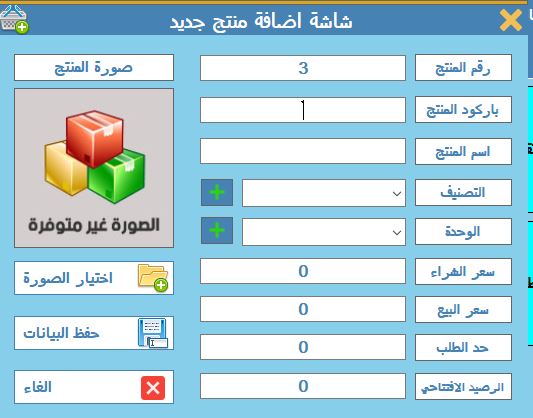
لدي برنامج مبيعات
وبرفق كود اضافة المنتج
اسم المنتج ( عصير )
احتاج اني ازود خانة ثانية باسم ( وحدة النصف )
وحدة المنتج ( وليكن كتبت داخلة اسم - صغير )
ياخذ من اسم المنتج كلمة ( عصير ) ومن وحدة المنتج ( صغير )
تظهر ( عصير - صغير )
وسعر المنتج و تصنيف يكون منفصل عن سعر ( اسم المنتج ) لكن بنفس التصننيف
كما موضح بالفيديو
وهذا كود اضافة المنتج
كود :
Imports System.Data.SqlClient

Imports System.IO


Public Class Frm_Add_Product


    Sub ClearText()

        Me.TxtProduct_ID.Text = Max_id("Product_Tbl", "Product_ID")

        Me.TxtProductCode.Text = vbNullString

        Me.TxtProductName.Text = vbNullString

        Me.CmbCat.Text = vbNullString

        Me.CmbUnit.Text = vbNullString

        Me.TxtProductLimit.Text = 0

        Me.TxtProductBuy.Text = 0.0

        Me.TxtProductSale.Text = 0.0

        Me.TxtProductOpenStock.Text = 0

        Me.PbProductImage.Image = My.Resources.imagenot

    End Sub


    Public Sub Insert_Product_Tbl(ByVal TxtProduct_ID As Int32, ByVal TxtProductCode As String, ByVal TxtProductName As String, ByVal CmbCat_ID As Int32, ByVal CmbUnit_ID As Int32, ByVal TxtProductLimit As Int32, ByVal TxtProductBuy As Decimal, ByVal TxtProductSale As Decimal, ByVal TxtProductOpenStock As Int32, ByVal PbProductImage As PictureBox)

        con = New SqlConnection(cs)

        Dim Cmd As New SqlCommand

        With Cmd

            .Connection = con

            .CommandType = CommandType.Text

            .CommandText = "Insert Into Product_Tbl ( Product_ID,ProductCode,ProductName,Cat_ID,Unit_ID,ProductLimit,ProductBuy,ProductSale,ProductSale1,ProductOpenStock,ProductImage)values(@Product_ID,@ProductCode,@ProductName,@Cat_ID,@Unit_ID,@ProductLimit,@ProductBuy,@ProductSale,@ProductSale1,@ProductOpenStock,@ProductImage)"

            .Parameters.Clear()

            .Parameters.AddWithValue("@Product_ID", SqlDbType.Int).Value = TxtProduct_ID

            .Parameters.AddWithValue("@ProductCode", SqlDbType.VarChar).Value = TxtProductCode

            .Parameters.AddWithValue("@ProductName", SqlDbType.VarChar).Value = TxtProductName

            .Parameters.AddWithValue("@Cat_ID", SqlDbType.Int).Value = CmbCat_ID

            .Parameters.AddWithValue("@Unit_ID", SqlDbType.Int).Value = CmbUnit_ID

            .Parameters.AddWithValue("@ProductLimit", SqlDbType.Int).Value = TxtProductLimit

            .Parameters.AddWithValue("@ProductBuy", SqlDbType.Decimal).Value = TxtProductBuy

            .Parameters.AddWithValue("@ProductSale", SqlDbType.Decimal).Value = TxtProductSale

            .Parameters.AddWithValue("@ProductOpenStock", SqlDbType.Int).Value = TxtProductOpenStock

            Dim ms As New MemoryStream()

            Dim bmpImage As New Bitmap(PbProductImage.Image)

            bmpImage.Save(ms, System.Drawing.Imaging.ImageFormat.Jpeg)

            Dim data As Byte() = ms.GetBuffer()

            Dim p As New SqlParameter("@ProductImage", SqlDbType.Image)

            p.Value = data

            .Parameters.Add(p)

        End With

        If con.State = 1 Then con.Close()

        con.Open()

        Cmd.ExecuteNonQuery()

        con.Close()

        'MsgBox("تم إضافة السجل بنجاح", MsgBoxStyle.Information, "حفظ")

        Cmd = Nothing

    End Sub

    ''tax

    Public Sub GetTax()

        con = New SqlConnection(cs)

        If con.State = 1 Then con.Close()

        con.Open()

        cmd = New SqlCommand(" select * from Tax_Tbl", con)

        rdr = cmd.ExecuteReader

        rdr.Read()

        If rdr.HasRows Then

            _TaxValue = CDbl(rdr("Tax_Value").ToString)

            rdr.Close()

            con.Close()

        End If

    End Sub

    ''tax

    Private Sub BtnSave_Click(sender As Object, e As EventArgs) Handles BtnSave.Click

        '' tax

        If My.Settings.AddTax = True Then

            'GetTax()

            TxtProductSale.Text = TxtProductSale.Text / 1.15

            '  TxtProductSale.Text = Strings.Format(Val(TxtProductSale.Text) / 1.15, "0.########################################") 'new

            ' TxtProductSale1.Text = TxtProductSale1.Text / 1.15

        End If

        '' tax

        If GetPrd_ID() = False Then


            If TxtProductCode.Text = vbNullString Or TxtProductName.Text = vbNullString Or CmbCat.Text = vbNullString Or CmbUnit.Text = vbNullString Or TxtProductBuy.Text = vbNullString Or TxtProductSale.Text = vbNullString Then

                MessageBox.Show(" عفواً ، قم بتعبئة كل الحقول", "تنبيه", MessageBoxButtons.OK, MessageBoxIcon.Error, MessageBoxDefaultButton.Button1, MessageBoxOptions.RightAlign)

                If TxtProductCode.Text = vbNullString Then TxtProductCode.Focus()

                If TxtProductName.Text = vbNullString Then TxtProductName.Focus()

                If CmbCat.Text = vbNullString Then CmbCat.Focus()

                If CmbUnit.Text = vbNullString Then CmbUnit.Focus()

                If TxtProductBuy.Text = vbNullString Then TxtProductBuy.Focus()

                If TxtProductSale.Text = vbNullString Then TxtProductSale.Focus()

                Exit Sub

            End If

            If MessageBox.Show("هل أنت متأكد انك تريد اضافة هذا المنتج الجديد ؟", "حفظ البيانات", MessageBoxButtons.YesNo, MessageBoxIcon.Question, MessageBoxDefaultButton.Button2) = Windows.Forms.DialogResult.No Then

                Exit Sub

            Else

                If GetPrd_Code() = True Then

                    MessageBox.Show(" عفواً ، رقم الباركود المراد ادخاله موجود بالفعل", "تنبيه", MessageBoxButtons.OK, MessageBoxIcon.Error, MessageBoxDefaultButton.Button1, MessageBoxOptions.RightAlign)

                    Exit Sub

                Else

                    Insert_Product_Tbl(TxtProduct_ID.Text, TxtProductCode.Text, TxtProductName.Text, CmbCat.SelectedValue, CmbUnit.SelectedValue, TxtProductLimit.Text, TxtProductBuy.Text, TxtProductSale.Text, TxtProductOpenStock.Text, PbProductImage)

                    LogFunc(Str_User, "تم اضافة المنتج  رقم " & TxtProduct_ID.Text)

                    ClearText()

                End If


            End If


        Else

            If TxtProductCode.Text = vbNullString Or TxtProductName.Text = vbNullString Or CmbCat.Text = vbNullString Or CmbUnit.Text = vbNullString Or TxtProductBuy.Text = vbNullString Or TxtProductSale.Text = vbNullString Then

                MessageBox.Show(" عفواً ، قم بتعبئة كل الحقول", "تنبيه", MessageBoxButtons.OK, MessageBoxIcon.Error, MessageBoxDefaultButton.Button1, MessageBoxOptions.RightAlign)

                If TxtProductCode.Text = vbNullString Then TxtProductCode.Focus()

                If TxtProductName.Text = vbNullString Then TxtProductName.Focus()

                If CmbCat.Text = vbNullString Then CmbCat.Focus()

                If CmbUnit.Text = vbNullString Then CmbUnit.Focus()

                If TxtProductBuy.Text = vbNullString Then TxtProductBuy.Focus()

                If TxtProductSale.Text = vbNullString Then TxtProductSale.Focus()

                Exit Sub

            End If

            If MessageBox.Show("هل أنت متأكد انك تريد تعديل بيانات المنتج  ؟", "حفظ البيانات", MessageBoxButtons.YesNo, MessageBoxIcon.Question, MessageBoxDefaultButton.Button2) = Windows.Forms.DialogResult.No Then

                Exit Sub

            Else

                Update_Product_Tbl(TxtProductCode.Text, TxtProductName.Text, CmbCat.SelectedValue, CmbUnit.SelectedValue, TxtProductLimit.Text, TxtProductBuy.Text, TxtProductSale.Text, TxtProductOpenStock.Text, PbProductImage, TxtProduct_ID.Text)

                LogFunc(Str_User, "تم تعديل المنتج  رقم " & TxtProduct_ID.Text)

                Me.Close()

                With Frm_Products

                    ' .MdiParent = Home

                    .LoadProduct()

                    Frm_Products.Show()

                End With


            End If

        End If


    End Sub

    Public Sub Load_Cat_Tbl()

        con = New SqlConnection(cs)

        Dim DT_Cat_Tbl As New DataTable

        CmbCat.DataSource = Nothing

        CmbCat.Items.Clear()

        CmbCat.Text = vbNullString

        DT_Cat_Tbl.Clear()

        Dim Da As New SqlDataAdapter("Select Cat_ID,CatName From Cat_Tbl ", con) '

        If con.State = 1 Then con.Close()

        con.Open()

        Da.Fill(DT_Cat_Tbl)

        con.Close()

        Da = Nothing

        If DT_Cat_Tbl.Rows.Count <> 0 Then

            With CmbCat

                .DataSource = DT_Cat_Tbl

                .DisplayMember = "CatName"

                .ValueMember = "Cat_ID"

            End With

        End If

        If CmbCat.Items.Count > 0 Then CmbCat.SelectedIndex = -1


    End Sub

    Public Sub Load_Unit_Tbl()

        con = New SqlConnection(cs)

        Dim DT_Unit_Tbl As New DataTable

        CmbUnit.DataSource = Nothing

        CmbUnit.Items.Clear()

        CmbUnit.Text = vbNullString

        DT_Unit_Tbl.Clear()

        Dim Da As New SqlDataAdapter("Select Unit_ID,UnitName From Unit_Tbl ", con) '

        If con.State = 1 Then con.Close()

        con.Open()

        Da.Fill(DT_Unit_Tbl)

        con.Close()

        Da = Nothing

        If DT_Unit_Tbl.Rows.Count <> 0 Then

            With CmbUnit

                .DataSource = DT_Unit_Tbl

                .DisplayMember = "UnitName"

                .ValueMember = "Unit_ID"

            End With

        End If

        If CmbUnit.Items.Count > 0 Then CmbUnit.SelectedIndex = -1


    End Sub


    Private Sub CmbCat_DropDown(sender As Object, e As EventArgs) Handles CmbCat.DropDown

        Load_Cat_Tbl()

    End Sub


    Private Sub CmbUnit_DropDown(sender As Object, e As EventArgs) Handles CmbUnit.DropDown

        Load_Unit_Tbl()

    End Sub


    Private Sub Label12_Click(sender As Object, e As EventArgs) Handles Label12.Click


        Frm_Cat.ShowDialog()

    End Sub


    Private Sub Label13_Click(sender As Object, e As EventArgs) Handles Label13.Click


        Frm_Unit.ShowDialog()

    End Sub


    Private Sub BtnBrowse_Click(sender As Object, e As EventArgs) Handles BtnBrowse.Click

        Try

            With OpenFileDialog1

                .Filter = ("Images |*.png; *.bmp; *.jpg;*.jpeg; *.gif;")

                .FilterIndex = 4

            End With

            OpenFileDialog1.FileName = ""

            If OpenFileDialog1.ShowDialog() = DialogResult.OK Then

                PbProductImage.Image = Image.FromFile(OpenFileDialog1.FileName)

            End If

        Catch ex As Exception

            MsgBox(ex.ToString())

        End Try

    End Sub


    Private Sub PictureBox1_Click(sender As Object, e As EventArgs) Handles PictureBox1.Click

        Me.Close()

    End Sub


    '*************************************************************

    Public Sub Update_Product_Tbl(ByVal TxtProductCode As String, ByVal TxtProductName As String, ByVal CmbCat_ID As Int32, ByVal CmbUnit_ID As Int32, ByVal TxtProductLimit As Int32, ByVal TxtProductBuy As Decimal, ByVal TxtProductSale As Decimal, ByVal TxtProductOpenStock As Int32, ProductImage As PictureBox, ByVal txtProduct_IDW As Int32)

        con = New SqlConnection(cs)

        Dim Cmd As New SqlCommand

        With Cmd

            .Connection = con

            .CommandType = CommandType.Text

            .CommandText = "Update Product_Tbl Set ProductCode = @ProductCode,ProductName = @ProductName,Cat_ID = @Cat_ID,Unit_ID = @Unit_ID,ProductLimit = @ProductLimit,ProductBuy = @ProductBuy,ProductSale = @ProductSale,ProductSale1 = @ProductSale1,ProductOpenStock = @ProductOpenStock,ProductImage = @ProductImage Where Product_ID = @Product_ID"

            .Parameters.Clear()

            .Parameters.AddWithValue("@ProductCode", SqlDbType.VarChar).Value = TxtProductCode

            .Parameters.AddWithValue("@ProductName", SqlDbType.VarChar).Value = TxtProductName

            .Parameters.AddWithValue("@Cat_ID", SqlDbType.Int).Value = CmbCat_ID

            .Parameters.AddWithValue("@Unit_ID", SqlDbType.Int).Value = CmbUnit_ID

            .Parameters.AddWithValue("@ProductLimit", SqlDbType.Int).Value = TxtProductLimit

            .Parameters.AddWithValue("@ProductBuy", SqlDbType.Decimal).Value = TxtProductBuy

            .Parameters.AddWithValue("@ProductSale", SqlDbType.Decimal).Value = TxtProductSale


            .Parameters.AddWithValue("@ProductOpenStock", SqlDbType.Int).Value = TxtProductOpenStock

            Dim ms As New MemoryStream()

            Dim bmpImage As New Bitmap(PbProductImage.Image)

            bmpImage.Save(ms, System.Drawing.Imaging.ImageFormat.Jpeg)

            Dim data As Byte() = ms.GetBuffer()

            Dim p As New SqlParameter("@ProductImage", SqlDbType.Image)

            p.Value = data

            .Parameters.Add(p)

            .Parameters.AddWithValue("@Product_ID", SqlDbType.Int).Value = txtProduct_IDW

        End With

        If con.State = 1 Then con.Close()

        con.Open()

        Cmd.ExecuteNonQuery()

        con.Close()

        MsgBox("تم تعديل السجل بنجاح", MsgBoxStyle.Information, "تعديل")

        Cmd = Nothing

    End Sub

    Public Function GetPrd_ID() As Boolean

        con = New SqlConnection(cs)

        If con.State = 1 Then con.Close()

        con.Open()

        cmd = New SqlCommand("Select * from Product_Tbl Where Product_ID=@Product_ID", con)

        cmd.Parameters.AddWithValue("@Product_ID", CInt(TxtProduct_ID.Text))

        rdr = cmd.ExecuteReader

        rdr.Read()

        If rdr.HasRows Then

            GetPrd_ID = True

        Else

            GetPrd_ID = False

        End If

        rdr.Close()

        con.Close()

        Return GetPrd_ID

    End Function


    Public Function GetPrd_Code() As Boolean

        con = New SqlConnection(cs)

        If con.State = 1 Then con.Close()

        con.Open()

        cmd = New SqlCommand("Select * from Product_Tbl Where ProductCode=@ProductCode", con)

        cmd.Parameters.AddWithValue("@ProductCode", TxtProductCode.Text)

        rdr = cmd.ExecuteReader

        rdr.Read()

        If rdr.HasRows Then

            GetPrd_Code = True

        Else

            GetPrd_Code = False

        End If

        rdr.Close()

        con.Close()

        Return GetPrd_Code

    End Function


    Private Sub CmbUnit_SelectedIndexChanged(sender As Object, e As EventArgs) Handles CmbUnit.SelectedIndexChanged


    End Sub


    Private Sub Label1_Click(sender As Object, e As EventArgs) Handles Label1.Click


    End Sub

    ' close form Ecs

    Sub New()


        ' This call is required by the designer.

        InitializeComponent()


        ' Add any initialization after the InitializeComponent() call.

        Dim Esc As New Button

        AddHandler Esc.Click, Sub(s, e) Close()

        Me.CancelButton = Esc


    End Sub


    Private Sub PeGroupboxEmbossed1_Click(sender As Object, e As EventArgs)


    End Sub


    Private Sub TxtProductOpenStock_TextChanged(sender As Object, e As EventArgs) Handles TxtProductOpenStock.TextChanged


    End Sub


    Private Sub TxtProductName_TextChanged(sender As Object, e As EventArgs) Handles TxtProductName.TextChanged


    End Sub


    Private Sub Label7_Click(sender As Object, e As EventArgs) Handles Label7.Click


    End Sub


    Private Sub TxtProductBuy_TextChanged(sender As Object, e As EventArgs) Handles TxtProductBuy.TextChanged


    End Sub


    Private Sub Label6_Click(sender As Object, e As EventArgs) Handles Label6.Click


    End Sub


    Private Sub TxtProductSale_TextChanged(sender As Object, e As EventArgs) Handles TxtProductSale.TextChanged


    End Sub


    Private Sub Frm_Add_Product_Load(sender As Object, e As EventArgs) Handles MyBase.Load


    End Sub


    Private Sub TxtProduct_ID_TextChanged(sender As Object, e As EventArgs) Handles TxtProduct_ID.TextChanged


    End Sub


    Private Sub TxtProductCode_TextChanged(sender As Object, e As EventArgs) Handles TxtProductCode.TextChanged


    End Sub


    Protected Overrides Sub Finalize()

        MyBase.Finalize()

    End Sub


    ' End close form Ecs

End Classhttps://f.top4top.io/m_25739pdaw1.mp4