


16-02-19, 06:10 PM
أعتذر فلدي vb 2012
ولكن تفضل الطريقة vb2008
إذهب لقائمة build
ثم
Configuration Manager
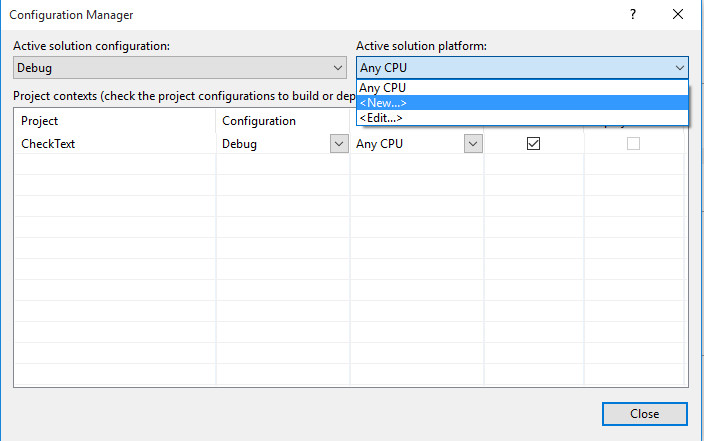
بعد الضغط على new هاتظهر لك
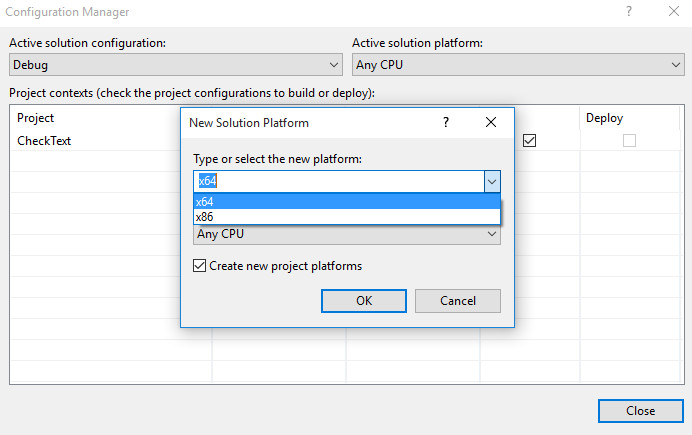
أختار x86 ثم ok ثم ok
وهذة طريقة أخرى لنسخة vb2008 express editions
Tools --> Options --> Projects and Solutions-->General Check "Show advanced build configurations"
If "Configuration Manager" doesn't show on the Buid menu, add it and click it.
Active Solution Platform --> New --> Type or select the new platform x86
ولكن تفضل الطريقة vb2008
إذهب لقائمة build
ثم
Configuration Manager
بعد الضغط على new هاتظهر لك
أختار x86 ثم ok ثم ok
وهذة طريقة أخرى لنسخة vb2008 express editions
Tools --> Options --> Projects and Solutions-->General Check "Show advanced build configurations"
If "Configuration Manager" doesn't show on the Buid menu, add it and click it.
Active Solution Platform --> New --> Type or select the new platform x86
تمنياتي لك بالتوفيق والنجاح
لا إله إلا الله وحده لا شريك له له الملك وله الحمد وهو على كل شئ قدير
سبحان الله وبحمده سبحان الله العظيم
سبحان الله والحمد لله ولا إله إلا الله والله أكبر ولا حول ولا قوة إلا بالله العلى العظيم
رب أغفر لي