


(08-06-19, 03:42 PM)ابراهيم ايبو كتب :السلام عليكم اخي الكريميبدو ان مشكلتك هي في حقل من الداتا غرايد حيث يقبل عددا محدودا من الاحرفاختر الداتا غرايد فيو ثم ادحل على Edit Columns واحتر العمود الذي تدخل فيه النص الطويلثم ادهب الى MaxInputLength وتحرى القيمة الموجودة بجانبهاواكتب الحد الاقصى لقيول الاحرف وهو 4294967294 أو 2147483647
دمت بخير
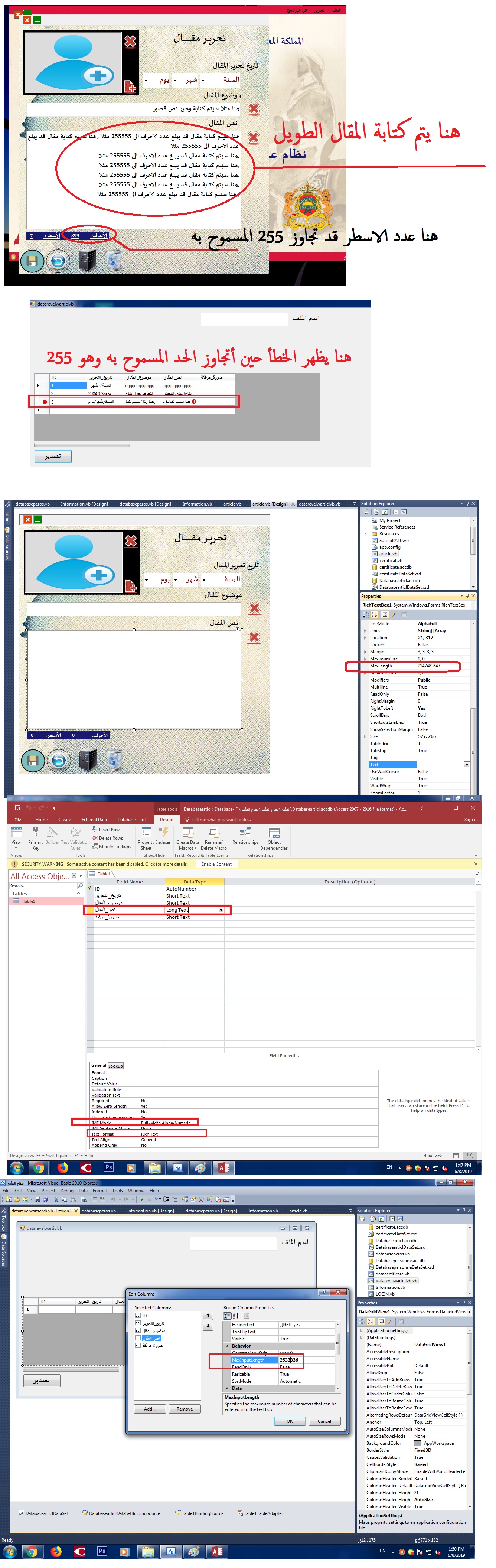
خلال بحثي عن الحل في هذه المشكلة وجدت نفس المشكللة مع أحد غيري
فكان الحل بالنص التالي :
It turns out that the culprit behind this error was a lack of communication between my program's dataset and the actual database. When I initially received the error, I left the text data I had entered in the database, changed the size allowance for the row in the DataGridView, and rebuilt my program. However, the dataset did not update to reflect the size change- communication had been shut down between the dataset and the database because the error had already happened. In other words, the dataset didn't update itself in order to 'protect' itself (even though that wasn't necessary).
I resolved the issue by rebinding my DGV in the designer. I set my DGV's data source property to none, deleted the three adapters that came with the connection, and deleted my old dataset. After everything was clear, I remade the data connection (using the same connection string) and the error had disappeared. I hope this helps anybody that runs into the same issue- those DGVs are sneaky.
لكنني لم أفهم ما القصود منه والا ما يشير بالتحديد
ومسار هذا الجواب من هنا howtogeek.com/howto/8711/stupid-geek-tricks-enable-the-secret-how-to-geek-mode-in-windows/
