


Private Sub Button7_Click(sender As Object, e As EventArgs) Handles Button7.Click
TextBox7.Text = Val(TextBox7.Text) + 3000
End Sub
Private Sub Button4_Click(sender As Object, e As EventArgs) Handles Button4.Click
TextBox8.Text = 2000
End Sub
Private Sub Button5_Click(sender As Object, e As EventArgs) Handles Button5.Click
TextBox9.Text = 1800
End Sub
Private Sub Button6_Click(sender As Object, e As EventArgs) Handles Button6.Click
TextBox10.Text = 1500
End Sub
TextBox7.Text = Val(TextBox7.Text) + 3000
End Sub
Private Sub Button4_Click(sender As Object, e As EventArgs) Handles Button4.Click
TextBox8.Text = 2000
End Sub
Private Sub Button5_Click(sender As Object, e As EventArgs) Handles Button5.Click
TextBox9.Text = 1800
End Sub
Private Sub Button6_Click(sender As Object, e As EventArgs) Handles Button6.Click
TextBox10.Text = 1500
End Sub
كود الحساب كاآتي:
Dim a, b, c, d, f, g, h, j, k, l, m, n, y, t, i As Double
a = Val(TextBox1.Text)
f = Val(TextBox5.Text)
j = Val(TextBox7.Text)
k = Val(TextBox8.Text)
l = Val(TextBox9.Text)
m = Val(TextBox10.Text)
h = Val(TextBox7.Text)
b = a / 5
c = a * 5 / 100
If c <= 1500 Then
c = 1500
End If
d = a * 1 / 100
If d <= 2000 Then
d = 2000
End If
g = c / 2
If a > 1000000 Then
i = 15000 + 10000 + ((a - 1000000) * 0.01)
ElseIf a > 500000 Then
i = 15000 + ((a - 500000) * 0.02)
ElseIf a <= 500000 Then
i = 15000
End If
n = (i + h + k + l + m) * 19 / 100
t = c + d + f + i + h + k + l + m + n
y = t - g
TextBox2.Text = Str(b)
TextBox3.Text = Str©
TextBox4.Text = Str(d)
TextBox6.Text = Str(i)
TextBox13.Text = Str(g)
TextBox11.Text = Str(n)
TextBox12.Text = Str(t)
TextBox14.Text = Str(y)
TextBox1.Text = FormatNumber(a, 2)
TextBox2.Text = FormatNumber(b, 2)
TextBox3.Text = FormatNumber(c, 2)
TextBox4.Text = FormatNumber(d, 2)
TextBox5.Text = FormatNumber(f, 2)
TextBox6.Text = FormatNumber(i, 2)
TextBox7.Text = FormatNumber(h, 2)
TextBox8.Text = FormatNumber(k, 2)
TextBox9.Text = FormatNumber(l, 2)
TextBox10.Text = FormatNumber(m, 2)
TextBox11.Text = FormatNumber(n, 2)
TextBox12.Text = FormatNumber(t, 2)
TextBox13.Text = FormatNumber(g, 2)
TextBox14.Text = FormatNumber(y, 2)
End Sub
a = Val(TextBox1.Text)
f = Val(TextBox5.Text)
j = Val(TextBox7.Text)
k = Val(TextBox8.Text)
l = Val(TextBox9.Text)
m = Val(TextBox10.Text)
h = Val(TextBox7.Text)
b = a / 5
c = a * 5 / 100
If c <= 1500 Then
c = 1500
End If
d = a * 1 / 100
If d <= 2000 Then
d = 2000
End If
g = c / 2
If a > 1000000 Then
i = 15000 + 10000 + ((a - 1000000) * 0.01)
ElseIf a > 500000 Then
i = 15000 + ((a - 500000) * 0.02)
ElseIf a <= 500000 Then
i = 15000
End If
n = (i + h + k + l + m) * 19 / 100
t = c + d + f + i + h + k + l + m + n
y = t - g
TextBox2.Text = Str(b)
TextBox3.Text = Str©
TextBox4.Text = Str(d)
TextBox6.Text = Str(i)
TextBox13.Text = Str(g)
TextBox11.Text = Str(n)
TextBox12.Text = Str(t)
TextBox14.Text = Str(y)
TextBox1.Text = FormatNumber(a, 2)
TextBox2.Text = FormatNumber(b, 2)
TextBox3.Text = FormatNumber(c, 2)
TextBox4.Text = FormatNumber(d, 2)
TextBox5.Text = FormatNumber(f, 2)
TextBox6.Text = FormatNumber(i, 2)
TextBox7.Text = FormatNumber(h, 2)
TextBox8.Text = FormatNumber(k, 2)
TextBox9.Text = FormatNumber(l, 2)
TextBox10.Text = FormatNumber(m, 2)
TextBox11.Text = FormatNumber(n, 2)
TextBox12.Text = FormatNumber(t, 2)
TextBox13.Text = FormatNumber(g, 2)
TextBox14.Text = FormatNumber(y, 2)
End Sub
(09-03-20, 06:25 PM)alsalamoni كتب :(09-03-20, 04:46 PM)paveldida كتب : السلام عليكم
اصادف مشكل غريب عند اعادة الضغط على Botton الحساب للمرة الثانية تتغير القيم بالشكل التالي ، لاكن المشكل اواجهه في اجهزة دون الأخرى لاني جربت على اكثر من جهاز
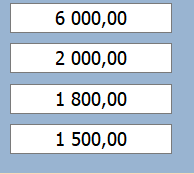
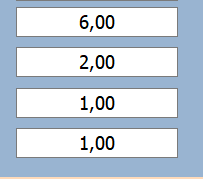
ضع الكود الذي تستخدمه مع توضيح اي الصورتين صحيحة او كيف المفروض ان يكون الناتج صحيحا
الصورة على اليمين هي النتيجة الصحيحة