


الفكرة ببساطة أن لدى main form عند الضغط فيها على button المسمى open videos
تفتح form أخرى بها AxWindowsMediaPlayer و combobox كما بالصورة
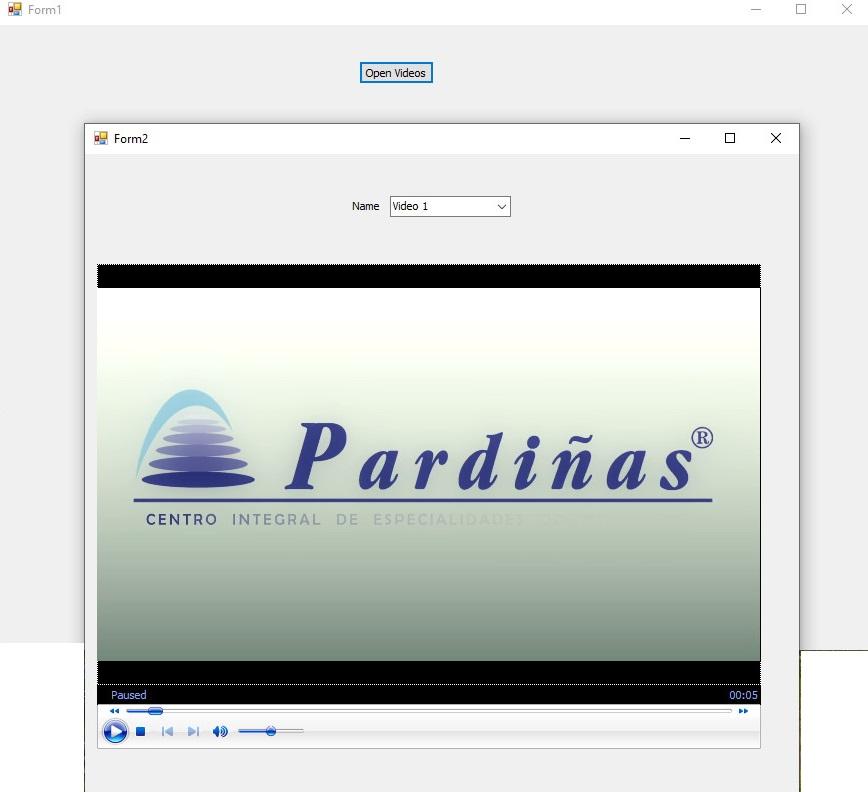
وعند اختيار video 1 مثلاً كما بالصورة يبدأ التشغيل ويعمل جيداً وأيضاً fullscreen mode يعمل
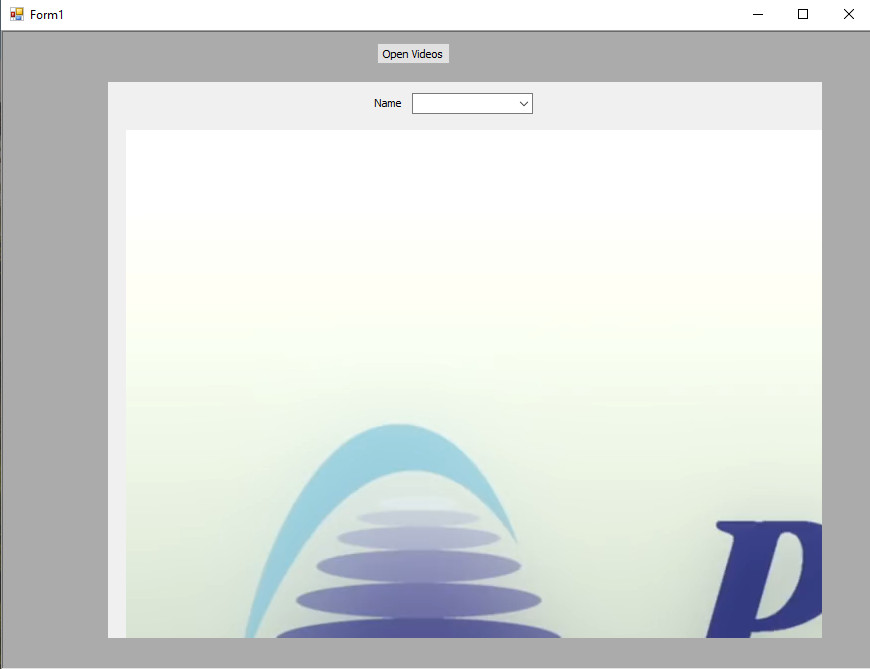
ولكن عند تعديل ال form الثانية لتكون child لل main form التى تصبح parent
لا يعمل الفيديو بالمقاس المناسب ولا تعمل أيضاً full screen mode كما بالصورة:
علماً أننى لم أغير أى شىء بالكود غير تحويلهم إلى child و parent فى هذا الكود:
وهذا هو كود ال form2 الخاص بتشغيل الفيديوهات وتلاحظون أننى حاولت أكثر من صيغة
ولكن المشكلة لا تزال قائمة
تفتح form أخرى بها AxWindowsMediaPlayer و combobox كما بالصورة
وعند اختيار video 1 مثلاً كما بالصورة يبدأ التشغيل ويعمل جيداً وأيضاً fullscreen mode يعمل
ولكن عند تعديل ال form الثانية لتكون child لل main form التى تصبح parent
لا يعمل الفيديو بالمقاس المناسب ولا تعمل أيضاً full screen mode كما بالصورة:
علماً أننى لم أغير أى شىء بالكود غير تحويلهم إلى child و parent فى هذا الكود:
كود :
   Private Sub Form1_Load(sender As Object, e As EventArgs) Handles MyBase.Load


        Form2.StartPosition = FormStartPosition.Manual

        Form2.Left = 105

        Form2.Top = 50

        Form2.MdiParent = Me


    End Sub
وهذا هو كود ال form2 الخاص بتشغيل الفيديوهات وتلاحظون أننى حاولت أكثر من صيغة
ولكن المشكلة لا تزال قائمة
كود :
Public Class Form2

    Private Sub ComboBox1_SelectedIndexChanged(sender As Object, e As EventArgs) Handles ComboBox1.SelectedIndexChanged


        If ComboBox1.SelectedItem = "Video 1" Then


            Dim b As Byte() = My.Resources.Video_1

            Dim TheFIlePath As String = "Video 1.mp4"

            Dim TempFile As IO.FileStream = IO.File.Create(TheFIlePath)

            TempFile.Write(b, 0, b.Length)

            TempFile.Close()

            AxWindowsMediaPlayer1.URL = (TheFIlePath)


        End If


        If ComboBox1.SelectedItem = "Video 2" Then


            On Error Resume Next

            IO.File.WriteAllBytes(IO.Path.GetTempPath & "\Video 2.mp4", My.Resources.Video_2)

            AxWindowsMediaPlayer1.URL = IO.Path.GetTempPath & "\Video 2.mp4"

            IO.File.Delete(IO.Path.GetTempPath & "\Video 2.mp4")


        End If


        If ComboBox1.SelectedItem = "Video 3" Then


            On Error Resume Next

            IO.File.WriteAllBytes(IO.Path.GetTempPath & "\Video 3.mp4", My.Resources.Video_3)

            AxWindowsMediaPlayer1.URL = IO.Path.GetTempPath & "\Video 3.mp4"

            IO.File.Delete(IO.Path.GetTempPath & "\Video 3.mp4")


        End If


    End Sub


End Class