


(20-11-15, 09:52 PM)HASAN6.0 كتب : يمكنك عمل تأثير Puff في مشروعك ..
يمكن ان تطبقه على اي Object كما في الصورة
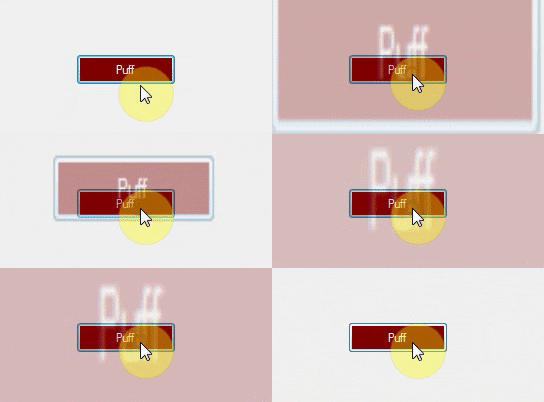
اضف Module جديد , وضع هذا الكود بداخلة
PHP كود :
Private PuffForm As Form
    Private i As Integer = 0
    Private Function TakeScreenShot(ByVal Control As Control) As Bitmap
        Dim Screenshot As New Bitmap(Control.Width, Control.Height)
        Control.DrawToBitmap(Screenshot, New Rectangle(0, 0, Control.Width, Control.Height))
        Return Screenshot
    End Function
    Public Sub Puff(ByVal Object_ As Object)
        If IsNothing(PuffForm) = False Then PuffForm.Close()
        Dim timer As New Timer
        timer.Enabled = True
        timer.Interval = 1
        AddHandler timer.Tick, AddressOf Timer_Tick
        Dim PForm As New Form
        Dim pic As New PictureBox
        pic.Image = TakeScreenShot(Object_)
        pic.SizeMode = PictureBoxSizeMode.StretchImage
        pic.Dock = DockStyle.Fill
        PForm.Controls.Add(pic)
        PForm.Opacity = 0.3
        PForm.FormBorderStyle = Windows.Forms.FormBorderStyle.None
        PForm.TopMost = True
        PForm.Size = Object_.Size
        PForm.Show()
        Object_.findform.Focus()
        PForm.Top = Object_.findform.Top + Object_.Top + Object_.Height / 2
        PForm.Left = Object_.findform.Left + Object_.Left
        PuffForm = PForm
        i = 30
    End Sub
    Private Sub Timer_Tick(sender As Object, e As EventArgs)
        If i = 0 Then Exit Sub
        Dim wi As Double = 2
        PuffForm.Top = PuffForm.Top - 4
        PuffForm.Height = PuffForm.Height + 8
        PuffForm.Left = PuffForm.Left - 4
        PuffForm.Width = PuffForm.Width + 8
        PuffForm.Opacity = PuffForm.Opacity - 0.01
        i = i - 1
        If i = 0 Then PuffForm.Close()
    End Sub
ثم في Button_click مثلاً
PHP كود :
Puff(Sender)

السلام عليكم
مشكور على الابداع الرائع
ولكن ليه ما بيطلع الافلاش حول البتون كما في الصورة عند تطبيق الكود بيطلع الفلاش فوق الشاشة او تحتها