تقييم الموضوع :
  • 0 أصوات - بمعدل 0
  • 1
  • 2
  • 3
  • 4
  • 5
[كود] طلب كود استخدام ip مخصص في WebBrowser
#11
[attachment=10331]
(13-04-16, 02:03 AM)hassan كتب :
(12-04-16, 04:21 PM)عبد الرحمن متولي كتب :
(09-04-16, 04:32 PM)hassan كتب :
(09-04-16, 02:53 PM)عبد الرحمن متولي كتب :
(09-04-16, 12:50 AM)hassan كتب : في المرفقات مشروع يمكنك تحديد الايبي المراد التصفح به في WebBrowser في بداية الاكواد ستجد هاذا


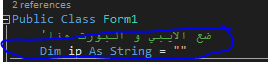
ضع به الايبي و البروت هكذا ("111.111.12.111:2222")

ملاحضة : من الافضل وضع عنوان الموضوع نبذة عن الطلب لكي تعم الفائدة وتجد المساعدة اسرع

شكرا لك

تم تعديل اسم الموضوع لتعم الفائدة

شكرا لك
شكرا شكرا لك اخي  سوف اجربه

العفوووووو اخي بانتضار ردك


شكرا لك
انا مش عندي برنامج نت فريم وراك ممكن توضع الاكواد هنا

تفضل
PHP كود :
Imports System.Runtime.InteropServices

Public Class Form1
    
'ضع الايبي و البورت هنا
    Dim ip As String = ""
    <Runtime.InteropServices.DllImport("wininet.dll", SetLastError:=True)> _
    Private Shared Function InternetSetOption(ByVal hInternet As IntPtr, ByVal dwOption As Integer, ByVal lpBuffer As IntPtr, ByVal lpdwBufferLength As Integer) As Boolean
    End Function

    Public Structure Struct_INTERNET_PROXY_INFO
        Public dwAccessType As Integer
        Public proxy As IntPtr
        Public proxyBypass As IntPtr
    End Structure

    Private Sub UseProxy(ByVal strProxy As String)
        Const INTERNET_OPTION_PROXY As Integer = 38
        Const INTERNET_OPEN_TYPE_PROXY As Integer = 3

        Dim struct_IPI As Struct_INTERNET_PROXY_INFO

        struct_IPI.dwAccessType = INTERNET_OPEN_TYPE_PROXY
        struct_IPI.proxy = Marshal.StringToHGlobalAnsi(strProxy)
        struct_IPI.proxyBypass = Marshal.StringToHGlobalAnsi("local")

        Dim intptrStruct As IntPtr = Marshal.AllocCoTaskMem(Marshal.SizeOf(struct_IPI))

        Marshal.StructureToPtr(struct_IPI, intptrStruct, True)

        Dim iReturn As Boolean = InternetSetOption(IntPtr.Zero, INTERNET_OPTION_PROXY, intptrStruct, System.Runtime.InteropServices.Marshal.SizeOf(struct_IPI))
    End Sub

    Private Sub Button1_Click(ByVal sender As System.Object, ByVal e As System.EventArgs) Handles Button1.Click
        WebBrowser1.Navigate(TextBox1.Text)
    End Sub


    Private Sub Form1_Load(sender As Object, e As EventArgs) Handles MyBase.Load
        UseProxy(ip)
    End Sub
End Class 

(01-05-16, 04:59 PM)bidaya كتب :
(13-04-16, 02:03 AM)hassan كتب :
(12-04-16, 04:21 PM)عبد الرحمن متولي كتب :
(09-04-16, 04:32 PM)hassan كتب :
(09-04-16, 02:53 PM)عبد الرحمن متولي كتب : شكرا شكرا لك اخي  سوف اجربه

العفوووووو اخي بانتضار ردك


شكرا لك
انا مش عندي برنامج نت فريم وراك ممكن توضع الاكواد هنا

تفضل
PHP كود :
Imports System.Runtime.InteropServices

Public Class Form1
    
'ضع الايبي و البورت هنا
    Dim ip As String = ""
    <Runtime.InteropServices.DllImport("wininet.dll", SetLastError:=True)> _
    Private Shared Function InternetSetOption(ByVal hInternet As IntPtr, ByVal dwOption As Integer, ByVal lpBuffer As IntPtr, ByVal lpdwBufferLength As Integer) As Boolean
    End Function

    Public Structure Struct_INTERNET_PROXY_INFO
        Public dwAccessType As Integer
        Public proxy As IntPtr
        Public proxyBypass As IntPtr
    End Structure

    Private Sub UseProxy(ByVal strProxy As String)
        Const INTERNET_OPTION_PROXY As Integer = 38
        Const INTERNET_OPEN_TYPE_PROXY As Integer = 3

        Dim struct_IPI As Struct_INTERNET_PROXY_INFO

        struct_IPI.dwAccessType = INTERNET_OPEN_TYPE_PROXY
        struct_IPI.proxy = Marshal.StringToHGlobalAnsi(strProxy)
        struct_IPI.proxyBypass = Marshal.StringToHGlobalAnsi("local")

        Dim intptrStruct As IntPtr = Marshal.AllocCoTaskMem(Marshal.SizeOf(struct_IPI))

        Marshal.StructureToPtr(struct_IPI, intptrStruct, True)

        Dim iReturn As Boolean = InternetSetOption(IntPtr.Zero, INTERNET_OPTION_PROXY, intptrStruct, System.Runtime.InteropServices.Marshal.SizeOf(struct_IPI))
    End Sub

    Private Sub Button1_Click(ByVal sender As System.Object, ByVal e As System.EventArgs) Handles Button1.Click
        WebBrowser1.Navigate(TextBox1.Text)
    End Sub


    Private Sub Form1_Load(sender As Object, e As EventArgs) Handles MyBase.Load
        UseProxy(ip)
    End Sub
End Class 

اخواجي واجهتني هذه المشكلة


الملفات المرفقة صورة/صور
   
الرد }}}
تم الشكر بواسطة:
#12
(01-05-16, 04:59 PM)bidaya كتب :
(13-04-16, 02:03 AM)hassan كتب :
(12-04-16, 04:21 PM)عبد الرحمن متولي كتب :
(09-04-16, 04:32 PM)hassan كتب :
(09-04-16, 02:53 PM)عبد الرحمن متولي كتب : شكرا شكرا لك اخي  سوف اجربه

العفوووووو اخي بانتضار ردك


شكرا لك
انا مش عندي برنامج نت فريم وراك ممكن توضع الاكواد هنا

تفضل
PHP كود :
Imports System.Runtime.InteropServices

Public Class Form1
    
'ضع الايبي و البورت هنا
    Dim ip As String = ""
    <Runtime.InteropServices.DllImport("wininet.dll", SetLastError:=True)> _
    Private Shared Function InternetSetOption(ByVal hInternet As IntPtr, ByVal dwOption As Integer, ByVal lpBuffer As IntPtr, ByVal lpdwBufferLength As Integer) As Boolean
    End Function

    Public Structure Struct_INTERNET_PROXY_INFO
        Public dwAccessType As Integer
        Public proxy As IntPtr
        Public proxyBypass As IntPtr
    End Structure

    Private Sub UseProxy(ByVal strProxy As String)
        Const INTERNET_OPTION_PROXY As Integer = 38
        Const INTERNET_OPEN_TYPE_PROXY As Integer = 3

        Dim struct_IPI As Struct_INTERNET_PROXY_INFO

        struct_IPI.dwAccessType = INTERNET_OPEN_TYPE_PROXY
        struct_IPI.proxy = Marshal.StringToHGlobalAnsi(strProxy)
        struct_IPI.proxyBypass = Marshal.StringToHGlobalAnsi("local")

        Dim intptrStruct As IntPtr = Marshal.AllocCoTaskMem(Marshal.SizeOf(struct_IPI))

        Marshal.StructureToPtr(struct_IPI, intptrStruct, True)

        Dim iReturn As Boolean = InternetSetOption(IntPtr.Zero, INTERNET_OPTION_PROXY, intptrStruct, System.Runtime.InteropServices.Marshal.SizeOf(struct_IPI))
    End Sub

    Private Sub Button1_Click(ByVal sender As System.Object, ByVal e As System.EventArgs) Handles Button1.Click
        WebBrowser1.Navigate(TextBox1.Text)
    End Sub


    Private Sub Form1_Load(sender As Object, e As EventArgs) Handles MyBase.Load
        UseProxy(ip)
    End Sub
End Class 

(01-05-16, 04:59 PM)bidaya كتب :
(13-04-16, 02:03 AM)hassan كتب :
(12-04-16, 04:21 PM)عبد الرحمن متولي كتب :
(09-04-16, 04:32 PM)hassan كتب : العفوووووو اخي بانتضار ردك


شكرا لك
انا مش عندي برنامج نت فريم وراك ممكن توضع الاكواد هنا

تفضل
PHP كود :
Imports System.Runtime.InteropServices

Public Class Form1
    
'ضع الايبي و البورت هنا
    Dim ip As String = ""
    <Runtime.InteropServices.DllImport("wininet.dll", SetLastError:=True)> _
    Private Shared Function InternetSetOption(ByVal hInternet As IntPtr, ByVal dwOption As Integer, ByVal lpBuffer As IntPtr, ByVal lpdwBufferLength As Integer) As Boolean
    End Function

    Public Structure Struct_INTERNET_PROXY_INFO
        Public dwAccessType As Integer
        Public proxy As IntPtr
        Public proxyBypass As IntPtr
    End Structure

    Private Sub UseProxy(ByVal strProxy As String)
        Const INTERNET_OPTION_PROXY As Integer = 38
        Const INTERNET_OPEN_TYPE_PROXY As Integer = 3

        Dim struct_IPI As Struct_INTERNET_PROXY_INFO

        struct_IPI.dwAccessType = INTERNET_OPEN_TYPE_PROXY
        struct_IPI.proxy = Marshal.StringToHGlobalAnsi(strProxy)
        struct_IPI.proxyBypass = Marshal.StringToHGlobalAnsi("local")

        Dim intptrStruct As IntPtr = Marshal.AllocCoTaskMem(Marshal.SizeOf(struct_IPI))

        Marshal.StructureToPtr(struct_IPI, intptrStruct, True)

        Dim iReturn As Boolean = InternetSetOption(IntPtr.Zero, INTERNET_OPTION_PROXY, intptrStruct, System.Runtime.InteropServices.Marshal.SizeOf(struct_IPI))
    End Sub

    Private Sub Button1_Click(ByVal sender As System.Object, ByVal e As System.EventArgs) Handles Button1.Click
        WebBrowser1.Navigate(TextBox1.Text)
    End Sub


    Private Sub Form1_Load(sender As Object, e As EventArgs) Handles MyBase.Load
        UseProxy(ip)
    End Sub
End Class 
اخواجي واجهتني هذه المشكلة

جرب على موقع اخر


شكرا لك
الحمد لله رب العالمين على كل شي
الرد }}}
تم الشكر بواسطة:
#13
 اسف اخي بل قمت بالتجريب لعدة مواقع
فلو سمحت اخي اريد تطبيق الطريقة على هذا الكود
 شكرا اخي الكريم الله يحفذك


                                                                         اريد التعديل على هذا الكود
الرد }}}
تم الشكر بواسطة:
#14
(02-05-16, 12:53 PM)bidaya كتب :
 اسف اخي بل قمت بالتجريب لعدة مواقع
فلو سمحت اخي اريد تطبيق الطريقة على هذا الكود
 شكرا اخي الكريم الله يحفذك


                                                                         اريد التعديل على هذا الكود

ارجو من الاساتذة الكرام النظر في هذا الطلب وشكرا
الرد }}}
تم الشكر بواسطة:


المواضيع المحتمل أن تكون متشابهة .
الموضوع : الكاتب الردود : المشاهدات : آخر رد
  كيف الى استخدام webview2 من ملف dll justforit 2 205 28-10-25, 02:49 AM
آخر رد: justforit
  [سؤال] حول استخدام ffmpeg مع progressbar justforit 2 244 09-10-25, 03:33 AM
آخر رد: justforit
  [VB.NET] استخدام كلمة برمجية كمتغير mmaalmesry 1 173 02-10-25, 08:55 AM
آخر رد: Taha Okla
  [VB.NET] مشكلة تظهر عند استخدام الملف manifest mmaalmesry 2 628 12-05-25, 12:15 AM
آخر رد: mmaalmesry
  [VB.NET] تحويل pdf الى صورة بدون استخدام الاكروبات بأستخدام adobe reader العادى فقط AhmedNagib 1 1,184 11-07-24, 01:16 PM
آخر رد: تركي الحلواني
  استخدام فونت جديد في البرنامج Emam emam 5 517 14-04-24, 01:29 PM
آخر رد: عبد العزيز البسكري
  [VB.NET] أرغب فى استخدام هذا الكود بالتحديد على الإصدار 10 AmeenRashed 3 522 19-01-24, 12:42 PM
آخر رد: Taha Okla
  [VB.NET] كيف اقوم بمنع المستخدم من استخدام الكيبورد وخصوصا مفتاح Print screen Ameenh 0 499 07-10-23, 10:45 PM
آخر رد: Ameenh
  اداة WebBrowser onejan1977 1 542 26-08-23, 06:53 PM
آخر رد: Taha Okla
  طريقة استخدام حلقة For Each ASUS2020 5 946 11-04-23, 01:26 AM
آخر رد: ASUS2020

التنقل السريع :


يقوم بقرائة الموضوع: بالاضافة الى ( 1 ) ضيف كريم